




 USD
USD


/ 10

Summary
A practical Dume.ai review covering workflows, pricing, strengths, weaknesses, and who should actually shortlist it.
Pros
Cons
Dume.ai Review Scores
Dume.ai Review: A Promising AI Executive Assistant Still Finding Its Footing
Dume.ai is positioning itself as the AI assistant that doesn't just answer questions — it actually does things. Connects to your Gmail, Jira, Notion, GitHub, and 50+ other tools. Runs automations. Sends you a morning briefing before you've had coffee. And now it ships with a desktop agent that works on your local files while you're away from your machine.
That pitch lands well on paper. Whether it holds up when real workflows hit it is a different conversation — and it's where this review is most useful.
What Is Dume.ai?
Dume.ai is an AI executive assistant built for knowledge workers who are juggling multiple productivity tools and losing hours to the friction between them. The core product is a chat-first web interface that connects to your work stack and executes tasks across it — not just retrieves information from it.
That distinction matters. Most AI chat tools operate on data you paste in. Dume plugs directly into Gmail, Google Calendar, Notion, Jira, GitHub, Confluence, Microsoft 365, Slack, and others via OAuth. Once connected, you can give it natural language commands — "draft a reply to this thread," "convert this PRD into Jira tickets," "summarize what's on my calendar today" — and it executes across those tools rather than summarizing what you already know.
The product has three surfaces. The web assistant handles inbox management, calendar, task flows, and workflow automation. Dume Cowork is a separate desktop app (macOS Apple Silicon and Windows x64) that handles local file work: organizing folders, building spreadsheets from receipts, preparing reports, analyzing notes, which can be controlled via WhatsApp if you're away from your desk. The Chrome extension brings the same assistant into the browser itself, working on any page you're currently viewing.
The category is workflow automation agent, with an executive assistant layer on top. It's not a simple chatbot. It's not a pure automation platform either. It sits in the space between the two, which is both its appeal and its current main challenge.
How Does Dume.ai Work?
The setup flow starts with connecting integrations via OAuth. Point Dume at Gmail, and it can read, sort, label, and draft replies. Connect Jira, and you can push tickets from a chat command. Connect GitHub, and it can pull PR summaries. The integrations are documented and confirmed across the core productivity stack.
Once connected, the workflow is conversational. You talk to Dume the way you'd brief a real assistant — "plan my Monday," "what's blocking the sprint this week," "write a client update based on the last three emails from this thread" — and it routes the request through the right connected app to take action.
For recurring work, the no-code workflow builder handles scheduled automations. The visual node editor supports trigger, delay, decision, and loop nodes, plus webhook connectivity for external events. The documented example that resonates most: a workflow that detects an email, summarizes it, drafts a reply, and creates a calendar event — all without you touching it. On the PRO tier, you get five AI-assisted workflow creations per month, which is Dume building the automation from a description you give it.
Cowork works differently. You point it at a folder or file, describe the task in plain English, and it shows you a plan before executing. For a batch of invoices: it proposes the spreadsheet structure, waits for approval, then extracts and organizes the data. For a messy Downloads folder: it maps out a filing structure, waits for your go-ahead, then reorganizes. The human-in-the-loop design is smart — the product runs locally and asks before doing anything destructive. That's the right call for a desktop agent at this stage.
The WhatsApp integration is real and live. You can send tasks to the web assistant or the desktop Cowork agent via WhatsApp, which is useful when you're not at a keyboard. The voice note support in WhatsApp makes this genuinely friction-free for on-the-go task delegation.
Key Features
- Email triage and morning briefing
These are the clearest workflow wins in the product. The email triage reads and labels your inbox before you open it. The morning briefing runs at 8:00 AM and surfaces what needs attention that day — open tasks, meetings, pending approvals. For anyone who spends the first hour of their day processing communication instead of doing actual work, this is the most immediately useful feature.
- Persistent memory
Dume remembers context, preferences, and decisions across sessions. You don't have to re-explain your preferences or re-paste context every time. This is what separates an assistant that learns from one that just processes isolated requests. The memory layer launched in late 2025 and adds real personalization depth over time.
- Multi-model AI selection
You choose the AI model for each task — GPT-5, Gemini, Perplexity, Mistral, and others depending on your tier. This matters for users running different task types. Research-heavy prompts might run better on Perplexity. Code-related tasks might warrant a different model. Having that flexibility within one subscription is a real differentiator, especially for users who'd otherwise pay for multiple AI tools.
- No-code workflow builder
The visual editor with trigger, delay, and decision nodes is more than a template gallery. Third-party reviewers have confirmed building email-to-Jira ticket chains that replaced repetitive manual steps. The workflow engine is newer than it looks — it launched in August 2025 — but the functional scope is meaningful.
- Dume Cowork desktop agent
Still in research preview, but this is the product's most distinctive bet. A desktop AI agent that handles local files without cloud uploads, controlled via chat or WhatsApp, runs autonomously on scheduled tasks. The privacy-first architecture (local processing, AES-256 encryption, no model training on user data) is a genuine selling point for users who've been skeptical of cloud-based AI tools accessing their files.
- MCP server connectivity
Dume supports the Model Context Protocol, meaning it can connect to any MCP-compatible server — the same open standard that powers Claude's integrations. This gives the platform extensibility beyond its native integrations list, which matters as the ecosystem grows.
Setup and Onboarding
For the web assistant, setup is fast. OAuth connections for Gmail and Google Calendar take a few minutes. The interface is clean and the first task is obvious: connect something, then talk to it. The free tier has enough functionality to evaluate whether the product fits your workflow before paying anything.
The Cowork desktop agent is download-and-run. No API key required, no complex configuration. You install it, point it at a folder, and give it a task. That's genuinely low friction for a desktop automation tool.
The Chrome extension is the same — install and use immediately.
Where things get more involved: meaningful workflow automation requires building workflows. The visual editor isn't hard, but it's not effortless either. And some integration depth requires configuration beyond the initial OAuth connection. Users expecting ChatGPT-level zero-setup will hit a mild learning curve when they get into scheduled automations, webhook triggers, or multi-step flows.
One caution worth flagging from user feedback: MCP-based connections (for tools like OneDrive, Excel via MCP rather than native integration) have reported unreliable behavior. Native integrations appear more stable than MCP-routed ones at this stage. That's an important distinction if your stack relies on Microsoft 365 tools accessed via MCP.
Real-World Use Cases
- Inbox and calendar management for solo operators
The morning briefing plus email triage combination is the strongest use case in the product. For a founder or freelancer getting 80–150 emails a day and coordinating across four calendars, having an assistant pre-process that before the workday starts is not a novelty — it's a real productivity lever.
- Product-to-ticket conversion
Taking a PRD or meeting notes and converting the outputs into structured Jira tickets is a well-documented use case with confirmed evidence. For PMs who manually do this translation multiple times a week, the time savings are real and the task is exactly the kind of well-structured, repeatable work that AI executes reliably.
- Standups and status updates
Pulling together a stand-up summary from Jira tickets, GitHub PRs, and Slack messages, then posting it to the right channel, is a documented workflow. For small engineering teams that spend 10 minutes a day doing this manually, automating it is low-risk and immediately valuable.
- Local file and document operations via Cowork
Organizing folders of receipts, contracts, or research papers into structured formats is where Cowork looks strongest. The human-approval step before execution makes this safe enough to trust with real files. It's not replacing a full document management system — but for individual operators with messy file structures and manual reporting workflows, it addresses a genuine pain point.
- Company and market research
Dume can pull structured analysis on a company from a single domain input — website, LinkedIn, news, funding, competitors. For analysts, business developers, or founders doing regular competitive research, this reduces a manual 30–45 minute task into something that happens in the background.
Who Is Dume.ai Best For?
- Solo founders and operators who currently manage Gmail, Calendar, Notion, Jira, or Slack manually and are losing meaningful time to inbox processing, status updates, and task management overhead.
- Freelancers handling high email volume with no support layer. The email triage and briefing features alone justify the entry-level subscription.
- Small product and engineering teams (5–20 people) who want automation across their work stack but don't have a developer or RevOps person to build it. The no-code workflow builder is genuinely accessible.
- Product managers who regularly translate specs into tickets, compile standups, and track PRs. These are high-frequency, low-creativity tasks that the product handles well.
- Knowledge workers operating on macOS or Windows who want an AI agent that can handle their local file chaos without connecting to the cloud. Cowork's privacy-first design is a meaningful selling point here.
Who Should Avoid Dume.ai?
- Enterprises that need multi-user governance, shared workflow management, audit trails, SSO, or compliance controls. None of those are confirmed capabilities. This is personal and small-team productivity tooling at its current stage.
- Teams whose primary need is complex multi-app automation with deep conditional logic and broad integration coverage. Zapier or Make will give you significantly more workflow breadth and battle-tested reliability. Dume's workflow engine is newer and narrower.
- Intel Mac users who want the Cowork desktop agent — only Apple Silicon and Windows x64 are currently supported.
- Users running Microsoft 365 tools (Outlook, OneDrive, Excel) as their primary stack. The native Microsoft 365 integration exists in documentation, but MCP-based connections to these tools have reported unreliable behavior. Until that stabilizes, this is a real friction point.
- Users who only need occasional AI help and would be better served by a simple ChatGPT or Claude subscription. The free tier's 20 messages per day limit will frustrate anyone treating this as a general-purpose chat tool.
Strengths
- The product actually executes rather than just responds. The gap between "AI that answers" and "AI that acts" is real, and Dume is genuinely on the action side of it. This isn't a chatbot wrapper around a Google Workspace search. It reads, drafts, creates, and triggers across connected tools.
- Three surfaces in one subscription at an accessible price point. Web assistant, Chrome extension, and desktop Cowork agent — plus WhatsApp as a control layer — under a single subscription starting at $8/month. At that price, the breadth is unusual.
- The no-code workflow builder has real logic, not just templates. Webhook triggers, conditional nodes, delay logic, and scheduled execution make this a functional automation layer, not a canned-flow library. Third-party users have confirmed building genuinely useful automation chains with it.
- The product velocity is meaningful. Twelve-plus major releases between May 2025 and March 2026 — memory layer, WhatsApp voice, workflow engine, desktop agent, Windows support, Chrome extension — is a real signal that the team is shipping fast and the product roadmap has momentum.
- Free tier is functional enough to evaluate properly. Twenty messages a day with one integration, five agents, and basic workflows is enough to know whether this fits your workflow before paying a dollar. That's the right way to build trust with skeptical buyers.
Weaknesses
- Cowork is in research preview, not production. The desktop agent is the product's most distinctive feature. It is also the least mature. "Research preview" is an explicit admission that stability and reliability are not yet guaranteed. For anyone considering Dume specifically for local file automation on critical files, that label carries real weight.
- The credit system is genuinely opaque. Plans list annual credit totals, but there's no public documentation explaining how different task types consume credits. A simple chat message versus a complex multi-step workflow presumably cost very different amounts — but users can't model that before hitting limits. One independent reviewer described unexpected credit exhaustion mid-workflow. This is solvable with better documentation, but it's a current trust gap.
- Several high-visibility interfaces are still Coming Soon. Slack, Telegram, Phone, and Email as input channels are all marked upcoming in the documentation. AI Calling on the MAX plan is similarly labeled. The gap between the product's positioned surface area and its actual current delivery is worth noting — not as a fatal flaw, but as a buyer's due diligence point.
- Collaboration tooling is thin. No confirmed multi-user dashboards, shared workflow ownership, permission controls, or audit logs. This isn't surprising for an early-stage product primarily targeting individuals and small teams — but it means any enterprise evaluation stops early.
- The limited-time pricing creates real uncertainty. The current "2x Credits Launch Offer" doubles the visible credit allocation across all paid plans. That promotional baseline shapes the value perception, but has no stated expiry. Buyers should evaluate the plan against half the listed credits to understand the baseline value.
Pricing and Plans
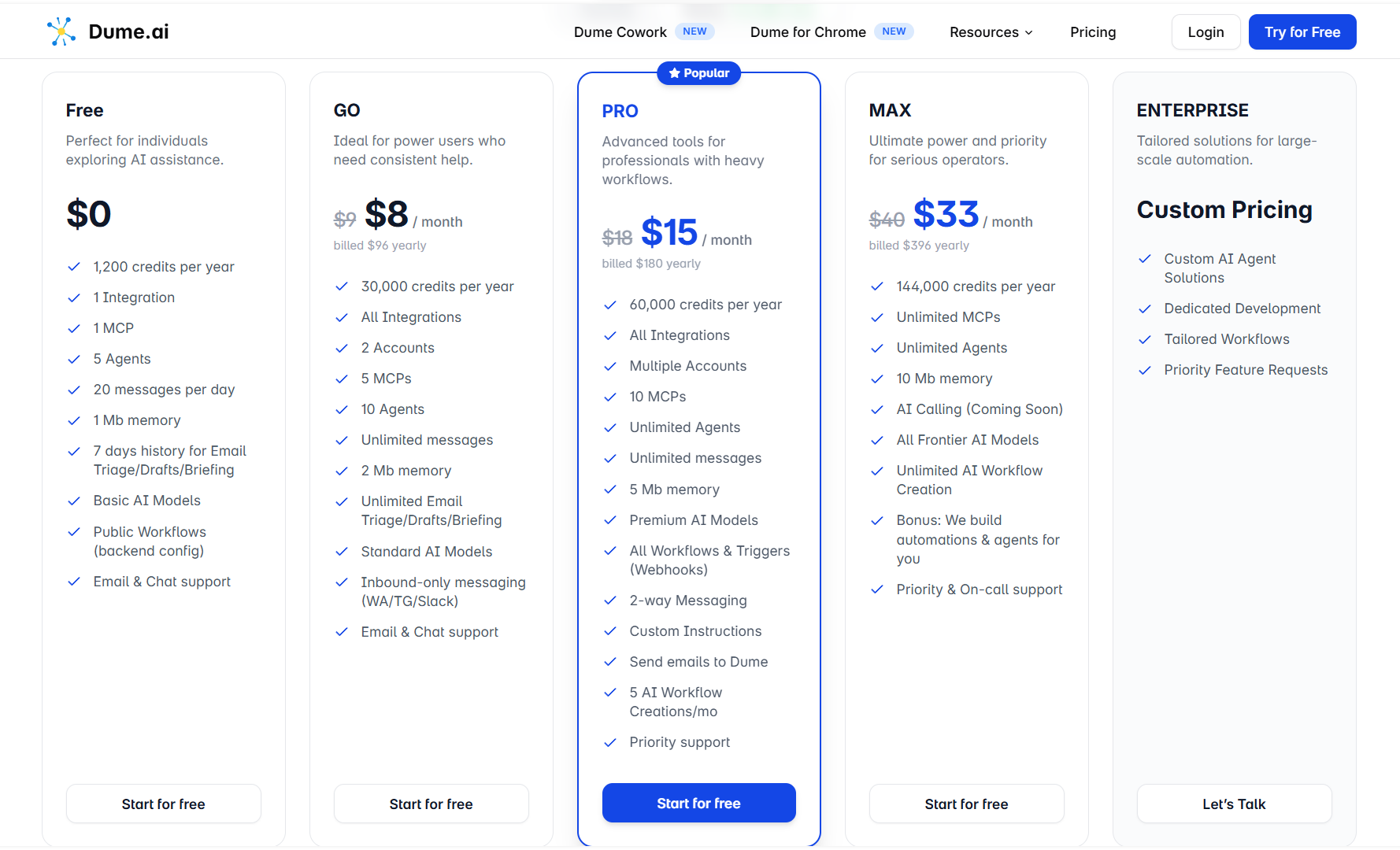
The structure is four tiers plus enterprise:
- Free — $0. One integration, 20 messages/day, five agents, basic AI models only. Functional for evaluation, not for daily use at any real volume.
- GO — $8/month (billed annually) or $9/month. All integrations, unlimited messages, 10 agents, standard AI models. The right entry point for individual users who want to stop evaluating and start using it.
- PRO — $15/month (annually) or $18/month. Multiple accounts, unlimited agents, premium models, 2-way WhatsApp/Telegram messaging, webhooks, custom instructions, five AI-built workflow creations per month. This is where the product gets genuinely useful for operators with heavier workflow needs.
- MAX — $33/month (annually) or $40/month. Unlimited MCPs and agents, all frontier models, unlimited AI workflow creation, and a concierge perk where Dume's team builds automations for you. AI Calling is listed but not yet live.
- Enterprise — Custom. Contact required.
Pricing is clear on structure. What's less clear is credit consumption mechanics — what tasks cost what. The promotional credit doubling also means the listed credit totals reflect a temporary state. Look at the base credit allocation (half what's shown) when deciding which plan fits your usage.
For solo operators and small teams, the GO to PRO range is where most buyers will land. The free tier is a legitimate trial, not a crippled preview.
How Dume.ai Compares With Alternatives
- Lindy.ai is the most direct comparison. Same positioning — AI executive assistant with workflow automation. Lindy has been live longer and has clearer workflow maturity for individual agent tasks like email management and meeting follow-ups. Dume appears broader in integration surface and adds desktop file automation that Lindy doesn't. Dume's entry pricing is lower. Buyers choosing between the two will mostly land on: Lindy if workflow reliability is the priority, Dume if breadth of execution surface and lower entry cost matters more.
- Zapier wins decisively on workflow breadth and integration depth. If your need is complex multi-app automation with 6,000+ integrations and production-grade reliability, Zapier isn't really a competitor — it's a different product category. Dume makes sense when you want an assistant-first interaction model that also automates, not when you're architecting enterprise workflow logic.
- Make is similarly a better choice for users who need sophisticated, branching automation logic with broad app support. The visual builders look superficially similar. Make is more powerful, more complex, and doesn't have an AI assistant layer. Dume is easier to use and more limited in scope.
- Claude Cowork (Anthropic) competes directly with Dume's desktop agent. Dume calls this out in its own footer with a comparison page. Anthropic's product carries stronger model quality assurance behind it, but Dume's Cowork combines local file automation with WhatsApp remote control and a tighter integration with the broader Dume assistant. Pricing also favors Dume. Without independent head-to-head testing, the model quality comparison can't be confirmed — but the feature surface comparison is real.
Final Verdict
Dume.ai is a genuine action-oriented AI assistant at an accessible price point, and the core use case is well-defined: you're a solo operator or small team with too many tools, too much manual coordination work, and not enough automation in your current stack.
The email triage, morning briefing, and workflow automation layer are the product's strongest offerings. These are confirmed, documented capabilities with positive independent validation. For founders, freelancers, and PMs who live in Gmail, Jira, and Notion, there's real value here at $8–15/month.
The Cowork desktop agent is interesting and early. If you're evaluating Dume specifically for local file automation, the research preview status is a genuine consideration — not a dealbreaker, but a risk to price in. Use it for less critical workflows first.
The main trust gap right now is opacity around credit consumption and the gap between the product's stated surface area (many "Coming Soon" interfaces) and what's actually live. Neither is damning for an early-stage product shipping at this pace. But they're worth knowing before you plan your stack around it.
Worth testing if you're a solo operator or small team doing manual inbox management, task coordination, and repetitive workflow work across Google Workspace, Jira, and Notion. The free tier is functional enough to know within a week whether it fits.
Shortlist with caution if your stack is Microsoft 365-heavy, if you need desktop automation reliability today, or if workflow complexity is your primary need. Those are real gaps at this stage.
Not the right fit if you're evaluating for enterprise governance, multi-user control, or production-grade automation at scale. The product isn't built for that yet.
FAQ
What is Dume.ai used for?
Dume.ai is an AI executive assistant that connects to your work tools — Gmail, Google Calendar, Notion, Jira, GitHub, Slack, and others — and executes tasks across them. Core use cases include email triage and drafting, calendar management, automating repetitive workflows, converting meeting notes or PRDs into Jira tickets, and generating daily briefings. A separate desktop agent (Dume Cowork) handles local file tasks like organizing folders, extracting data from receipts, and preparing reports.
How does Dume.ai work?
You connect your tools via OAuth, then give Dume natural language commands through a chat interface, WhatsApp, or the Chrome extension. It routes those commands through the right connected apps and executes the task. For recurring work, a no-code visual workflow builder handles scheduled or triggered automations. The Cowork desktop app operates locally on your machine and shows a plan before executing any significant action.
Who should use Dume.ai?
It's best suited to solo founders, freelancers, and small teams (under 20 people) who manage multiple tools manually and want to automate inbox processing, task management, and workflow coordination without building custom integrations. Product managers who regularly move between Jira, GitHub, and Slack will find specific high-value use cases.
Does Dume.ai offer a free plan or trial?
Yes. There's a free plan with no credit card required. It includes one integration, 20 messages per day, five agents, and basic AI models — enough to test the product's core behavior before committing. Paid plans start at $8/month (billed annually).
What are the main alternatives to Dume.ai?
The closest direct alternative for the AI executive assistant positioning is Lindy.ai. For pure workflow automation breadth, Zapier and Make are more mature and powerful. For desktop AI agent use cases, Claude Cowork from Anthropic competes in the same space. The right choice depends on whether you want assistant-first interaction, automation depth, or local file handling.
Is the pricing straightforward?
The plan tiers are clearly structured. The main opacity is in credit consumption — the platform uses a credit-based usage system, but how different task types consume credits isn't publicly documented, which makes it hard to predict usage costs before you hit limits. A promotional "2x Credits" offer is currently live, meaning listed credit totals are temporarily doubled; evaluate against base allocations when planning.
Verdict at a Glance
- Best for: Solo operators, freelancers, and small teams doing manual inbox management, task coordination, and repetitive workflow work across Google Workspace, Jira, and Notion
- Not ideal for: Enterprise users needing governance controls, Intel Mac users wanting Cowork, or teams whose primary need is complex multi-app automation depth
- Core strength: Genuinely executes across connected tools — not just a chatbot, but an assistant with real action capability across a broad tool surface at an accessible price
- Main tradeoff: The Cowork desktop agent is in research preview, the credit system is opaque, and several high-profile interfaces are still Coming Soon — this is a strong early-stage product, not a fully mature platform
- Bottom line: If your daily grind involves too many tabs, too much inbox processing, and repetitive task coordination work you've been doing manually, Dume.ai is worth a free-tier test. The core features are real, the price is right, and the product is shipping fast.
Disclosure: This article may contain affiliate links. If you sign up through them, Coin360 may earn a commission at no extra cost to you. That does not affect our editorial standards, and reviews are written to prioritize accuracy, usefulness, and reader value.


