




 USD
USD

/ 10

Summary
Fireflies.ai delivers strong meeting transcription, CRM routing, and searchable archives for high-call teams.
Pros
Cons
Fireflies Review Scores
Fireflies.ai Review: A Meeting Assistant That Actually Earns Its Keep — If You Use It Right
Most AI meeting tools promise to save you from your own inbox. Fireflies.ai is one of the few that has built enough product depth to back that claim up — at least for the right team. It records, transcribes, summarizes, and pushes meeting content into your CRM, Slack, Notion, or ATS automatically. For teams drowning in calls, that is a meaningful reduction in documentation overhead. For teams with more occasional meeting loads, it is probably more than they need.
This review covers what Fireflies actually does well, where it starts showing cracks, and whether the pricing makes sense once you understand what you are really paying for.
What Is Fireflies.ai?
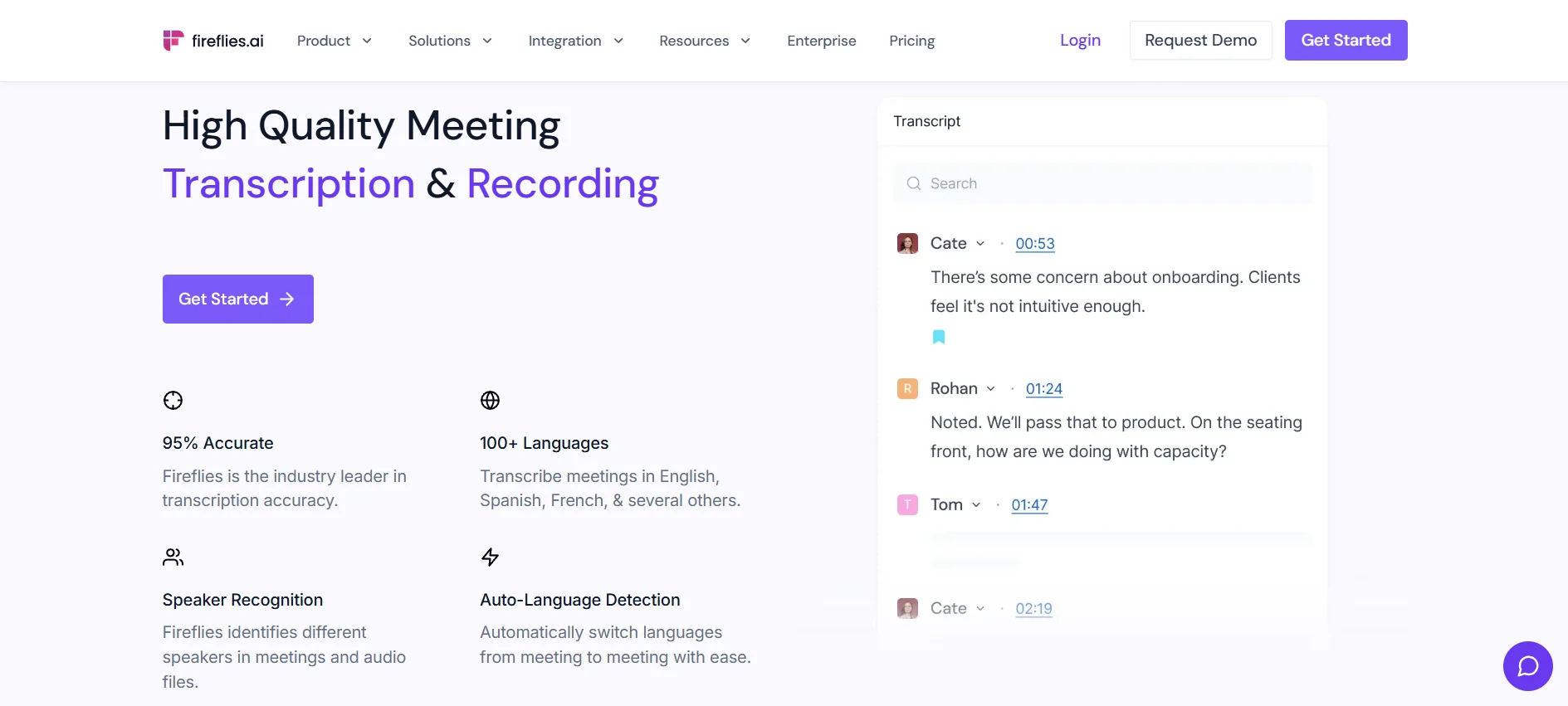
Fireflies is an AI meeting assistant — more specifically, an AI-powered meeting documentation and workflow routing tool. It sits in the category of meeting intelligence, which is distinct from general workflow automation even though that is its closest framework match.
The core job it solves is simple: stop losing what happens in meetings. Not just the transcript. The decisions, action items, assigned tasks, topic patterns, and conversation context that normally live in someone's notebook, a half-finished Notion doc, or no one's memory at all.
What sets it apart from a basic transcription app is the downstream routing. After a call ends, Fireflies can automatically push a structured summary, speaker-labeled transcript, and extracted action items into Salesforce, HubSpot, Slack, Asana, Notion, or your ATS. That integration layer is the product's real pitch. Without it, Fireflies is a more polished version of Otter. With it, it functions as meeting data infrastructure.
Founded by Krish Ramineni (MIT) and backed by Khosla Ventures and Canaan Partners, Fireflies claims 20 million users, 800,000+ organizations, and more than 3 billion meeting minutes processed. Those are vendor-sourced numbers, but the G2 review volume (700+ reviews, 4.7/5) and Fortune 500 enterprise adoption suggest the scale is real.
How Does Fireflies.ai Work?
The default setup is bot-based. Once you connect your Google Calendar or Outlook, a participant called "Fireflies.ai Notetaker" auto-joins every scheduled meeting on Zoom, Google Meet, Teams, or Webex. It records the audio, transcribes in real time with speaker labels, and delivers a structured AI summary to your email and dashboard within minutes of the call ending.
You also get AskFred — a conversational assistant layered over your entire meeting archive. If you want to know what a client said about pricing three months ago, or when a specific feature got committed to, you ask Fred. It searches across transcripts and surfaces the relevant moment with a timestamp.
Beyond the post-meeting workflow, Fireflies launched Live Assist in November 2025, which is a meaningful product shift. Live Assist runs a real-time panel during meetings, surfacing answers from your knowledge base and past calls without you leaving the conversation. There is also a Sales Assist variant that helps reps respond to objections mid-call using context from prior conversations. Advanced Live Assist features consume AI credits, and early user coverage is thin — this is a new capability and the independent signal on how well it works in practice is still building.
For users who find the bot participant uncomfortable, the Desktop App (Mac and Windows, launched the same month) enables local audio capture without deploying a bot into the call. The recordings still route through Fireflies for processing and integration. That distinction matters in client-facing contexts where a visible AI participant in your meeting can create friction.
Fireflies also launches its own mobile app that helps users record, transcribe, summarize, and analyze in-person or virtual meetings with AI-powered notes, searchable transcripts, action items, and seamless syncing across mobile and desktop workflows.
Audio files can also be uploaded manually for transcription if you are working with recorded content that was not captured live.
Key Features
- The integration layer. This is the reason to choose Fireflies over lighter alternatives. With 90+ native integrations — including Salesforce, HubSpot, Pipedrive, Slack, Notion, Asana, Trello, Greenhouse, Lever, Zapier, and most major video platforms — meeting content moves automatically into the tools where work actually happens. A sales call ends and the summary, action items, and next steps are already in the CRM contact record. A recruiting interview finishes and the transcript and notes are in the ATS. That removes a real operational burden, not a hypothetical one.
- Smart search and meeting archive. The global search across all transcripts is genuinely useful. Filtering by speaker, topic, date, sentiment, or keyword gives teams the ability to treat their call history as a queryable knowledge base. In testing by other reviewers, the recall capability — finding specific phrases from calls months prior — was cited as one of the product's highest-value features by regular users.
- Conversation analytics. Talk-time ratios, sentiment detection, question tracking, and topic trend analysis are available from Business tier upward. For managers reviewing how their team communicates in sales or recruiting calls, this provides coaching data without buying a separate tool. It is not as deep as Gong's pipeline intelligence, but for most teams it covers the practical range of what they would actually look at.
- AskFred. Cross-meeting querying is more useful than it sounds, especially if you are managing ongoing client relationships or complex internal projects. The ability to ask "what did we agree to in that last all-hands about the Q3 roadmap" and get a timestamped answer is practically valuable. The caveat: AskFred consumes AI credits, which brings us to the pricing section.
- Live Assist and Desktop App. Both are directionally strong product moves. Live Assist addresses the most common complaint about meeting tools — that they only help after the fact. The Desktop App addresses the bot-consent problem. Neither has meaningful independent user review coverage yet, so the claims are still mostly vendor-narrated.
Setup and Onboarding
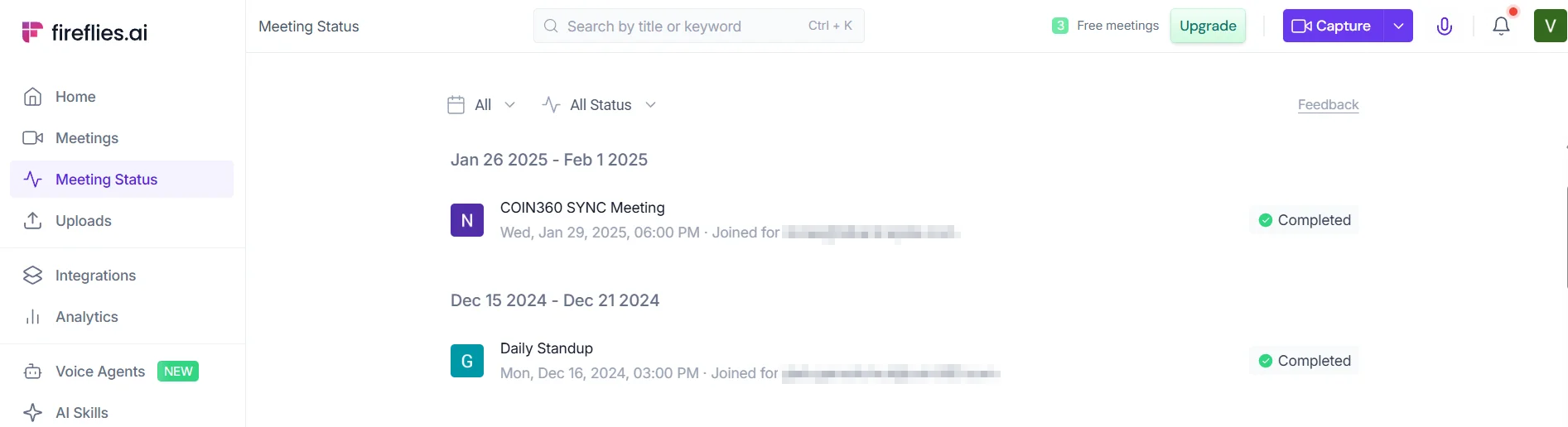
Getting started is straightforward. Connect your calendar, and Fireflies begins joining meetings automatically. No technical setup, no downloads required for the core product. Most users are capturing and receiving summaries within the same day they sign up.
The setup experience gets bumpier in two places.
First, the auto-join defaults are aggressive. Without careful calibration, the bot will join every scheduled meeting on your calendar — including sensitive 1-on-1s, HR discussions, or calls with clients who have not been told they are being recorded. Multiple G2 and Capterra users flag this as a real social and legal risk. The controls exist, but managing them requires active attention. The rules engine that gives Enterprise admins automated routing control over which calls the bot joins is locked at the highest tier. For everyone else, it is a manual setting problem.
Second, Microsoft 365 integration — Teams and Outlook specifically — has documented friction. Multiple Capterra reviews describe needing workarounds for account linking, particularly in corporate IT environments. This is worth flagging for teams whose primary meeting infrastructure is Microsoft.
For the core sales and recruiting use cases, deeper value requires CRM field mapping, integration configuration, and topic tracker setup. None of that is technically demanding, but it takes more than a few minutes to get right. The product is quick to start; meaningful integration payoff takes deliberate setup work.
Real-World Use Cases
- Sales call documentation. The clearest ROI scenario. A rep finishes a discovery call, and within minutes the summary, action items, and next steps are logged to the CRM contact record automatically. No manual note-entry after the call. No forgotten commitments. This is the use case Fireflies is most obviously built for, and the CRM integration depth supports it directly.
- Recruiting and interviewing. High-volume interview pipelines benefit significantly from automatic transcripts, structured summaries, and ATS routing. Recruiters can review a searchable record of what a candidate said rather than relying on handwritten notes from back-to-back calls. The ability to query across candidate conversations using AskFred has practical value in later-stage comparisons.
- Distributed team decision tracking. For remote teams where meeting decisions routinely get lost, the searchable archive is a real operational asset. The channels feature allows meeting summaries to be automatically pushed to relevant Slack channels or team workspaces. This is particularly valuable for async-heavy organizations where not everyone attends every call.
- Client call management. Consultants, account managers, and founders running frequent external calls can build a structured history of client conversations without additional documentation work. The meeting prep feature — which surfaces a briefing before each recurring call — is a practical quality-of-life improvement for relationship-heavy roles.
- Manager coaching and performance review. The conversation intelligence layer — talk time, sentiment, question patterns across a team's calls — gives managers visibility into how their team communicates without listening to every recording individually. Not a Gong replacement, but for most SMB or mid-market teams, it does the job.
Who Is Fireflies.ai Best For?
- Sales teams that run significant call volume and need CRM logging automated are the strongest fit. The integration depth and auto-summary pipeline were clearly built around this use case first.
- Recruiting teams doing high-volume interviewing get disproportionate value from the searchable transcript archive and ATS integrations.
- Remote and distributed organizations that need a shared, queryable record of meeting decisions — not just individual note archives — are a strong fit, especially if they are already using Slack, Notion, or Google Workspace.
- Founders and operators managing dense schedules of client and internal calls will get clear value from the elimination of manual documentation work, provided they configure integrations properly.
- Teams already embedded in the integrations Fireflies supports — Salesforce, HubSpot, Slack, Notion, Asana — get the most out of the platform. The more of your stack it connects to, the more the per-seat cost is justified.
Who Should Avoid Fireflies.ai?
- Teams conducting sensitive client-facing work where a visible bot in the meeting is commercially or legally problematic should think carefully before defaulting to the bot-based workflow. The Desktop App reduces this, but it requires the Pro plan and deliberate configuration.
- Solo users and freelancers with occasional meeting needs are probably better served by Fathom's free tier, which offers unlimited recordings and basic summaries without a credit system, a storage cap, or integration complexity.
- Organizations in Illinois or other BIPA-sensitive jurisdictions should be aware of the active class action filed in March 2026, which alleges Fireflies collects voiceprints from non-users without the required consent and notice. The lawsuit status is unresolved. Enterprise procurement and legal teams will want to flag it.
- Teams that need deep revenue intelligence — structured call scoring, deal forecasting, pipeline analytics, rep performance frameworks — will hit Fireflies' ceiling fast. The conversation analytics are useful for managers who want coaching data, but they are not a Gong substitute.
- Enterprise buyers with complex Microsoft 365 environments should investigate the Teams and Outlook integration limitations before committing to a multi-seat rollout.
Strengths
- Integration breadth is a genuine differentiator. At 90+ native connectors, Fireflies functions as a meeting data pipeline that automatically feeds content into the tools where decisions actually get acted on. This is the strongest argument for Fireflies over lighter transcription tools that stop at the summary email.
- Low friction to first value. Calendar connect and you are capturing meetings. Most of the core product works without technical configuration. The onboarding curve is real for advanced integration use, but the basic workflow is self-serve and quick.
- Cross-meeting search is operationally valuable. The ability to query across months of transcripts by keyword, speaker, topic, or sentiment is not a gimmick — it directly addresses the problem of organizational knowledge disappearing into meeting recordings that no one revisits. Teams that use it regularly report it becoming a core operational tool.
- Competitive Pro-plan pricing. At $10/seat/month annually, the Pro plan delivers unlimited transcription, summaries, action items, and integrations. That is credible value relative to the core job it performs, assuming usage patterns do not push heavily into AI credit consumption.
- 100+ language support. Genuinely broad multilingual coverage makes the product accessible to non-English teams and global distributed organizations where most competitors optimize primarily for English.
Weaknesses
- The AI credits system is where the pricing story breaks down. The listed per-seat price is the starting point, not the full cost for active users. AskFred queries, enhanced summaries, AI apps, and Live Assist all consume a monthly AI credit pool. Once that pool depletes, advanced features pause until the next cycle or you buy more credits. Heavy users regularly report effective costs running two to three times the base subscription price. The credit pricing is not prominently disclosed before signup, and the depletion mechanics are not intuitive. This is the most significant trust issue with Fireflies' current commercial positioning.
- The billing and cancellation experience has a documented problem. Trustpilot scores (4.3) lag meaningfully behind G2 (4.7–4.8), and the gap is almost entirely explained by cancellation complaints — reports of cancel buttons being greyed out, unexpected multi-seat charges post-trial, and auto-billing on annual plans after a trial that required credit card entry. The refund policy limits refunds once more than 20 meetings have been recorded, even on annual plans. This pattern is consistent enough across multiple independent review sources to flag clearly.
- The bot-in-the-meeting model carries real adoption friction. The visible Fireflies notetaker as a named meeting participant makes consent management both a social and legal issue. Universities have banned notetaker bots. Enterprise IT departments increasingly block them. Client-facing teams discover the awkwardness in client calls, not before. The Desktop App addresses this, but only for users on paid plans who configure it.
- The BIPA class action is an open legal risk. The March 2026 class action (Case No. 1:26-cv-02675, N.D. Illinois) alleges collection of voiceprints from people who never created a Fireflies account — participants in meetings recorded by others. The outcome is unresolved, but the exposure is relevant for enterprise legal review.
- Video recording requires a Business plan upgrade. If your meetings involve screen shares or presentations — which most modern video calls do — the $10/seat Pro plan does not include video capture. Getting video means jumping to $19/seat annually. That is a 90% price increase for what many users will consider a baseline expectation.
- Transcription accuracy degrades at the edges. In clean audio environments with standard English accents, Fireflies lands in the mid-90s for accuracy. That drops with heavy accents, specialized terminology (legal, medical, highly technical), multi-speaker crosstalk, and poor audio conditions. G2 documents nearly 40 reviews flagging AI inaccuracy. For users who need transcripts that are precise enough for formal documentation, this matters more than the average use case.
Pricing and Plans
Four tiers: Free, Pro, Business, and Enterprise. Annual billing cuts the cost by roughly 40–44% versus monthly.
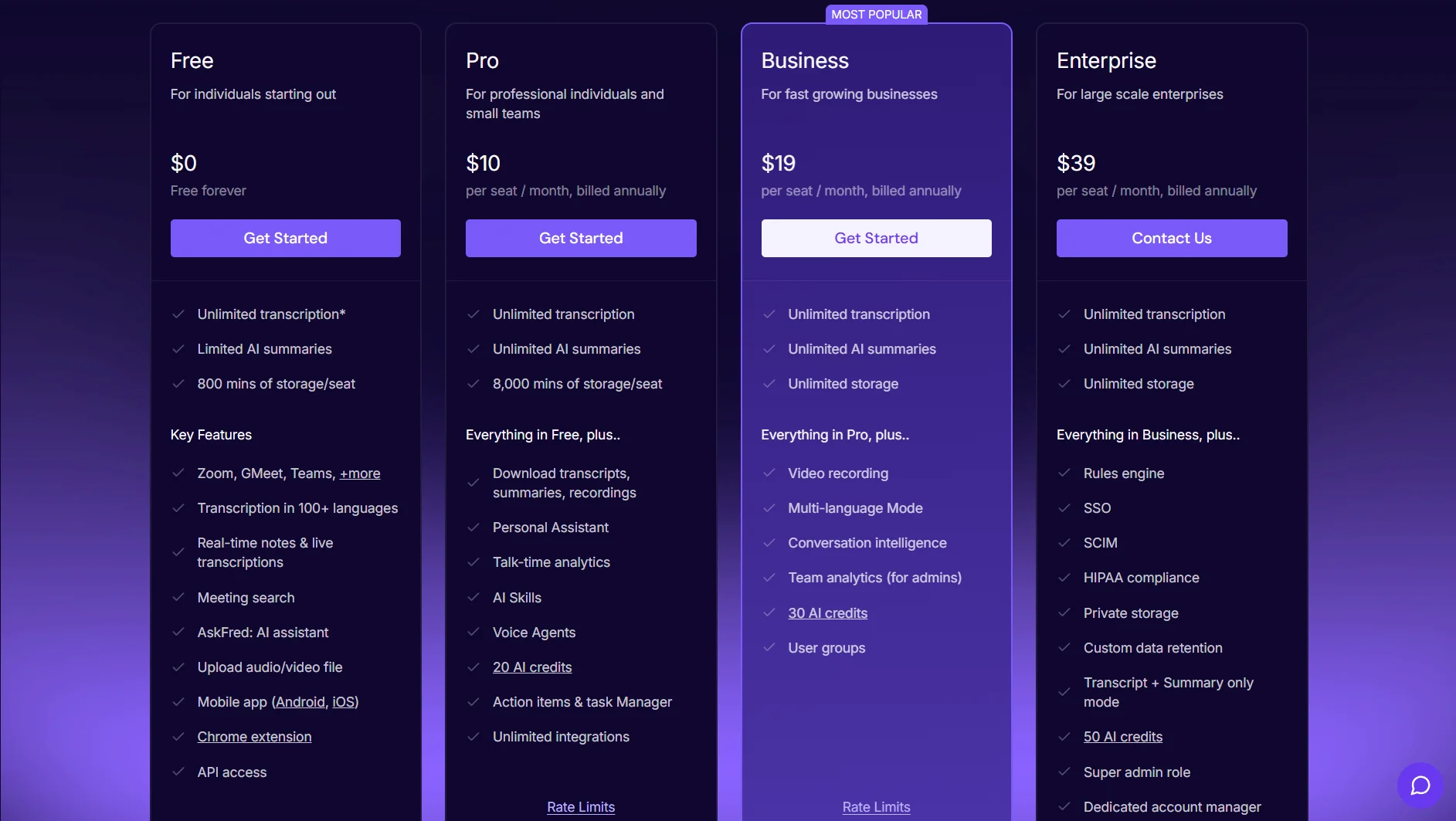
The Free plan is genuinely usable as a trial — unlimited transcription with rate limits, limited AI summaries, 800 minutes of storage per seat. That storage fills in about six weeks of regular meeting use. The lack of AI summaries and integration access makes it more of an onboarding experience than a sustained working option.
The Pro plan ($10/seat/month annually, $18 monthly) is the right entry point for individual users and small teams. Unlimited transcription, unlimited summaries, 8,000 minutes of storage, 20 AI credits per month, and access to all integrations. The storage cap is a meaningful constraint — heavy users of Fireflies will hit 8,000 minutes in four to five months if they are running multiple calls daily. At that point, the choice is deleting old recordings or upgrading to Business. That calculus is worth running before committing to annual Pro pricing.
The Business plan ($19/seat/month annually, $29 monthly) unlocks video recording, unlimited storage, multi-language mode, conversation intelligence, and team analytics. For most meaningful team deployments — especially sales organizations — Business is the practical minimum.
The Enterprise plan ($39/seat/month, annual only) adds HIPAA compliance, SSO, SCIM, private storage, custom data retention, and the rules engine. Healthcare organizations and regulated enterprises are the clear target.
The AI credit system is the piece the headline pricing does not tell you. Every plan includes a monthly credit allocation (20 for Free and Pro, 30 for Business, 50 for Enterprise). Advanced features — AskFred queries, AI app automations, enhanced summaries, Live Assist — consume these credits. Once depleted, those features suspend until the next cycle or you purchase add-on packs ranging from $5 to $600 depending on volume. For light users this is invisible. For teams leaning heavily on AskFred or AI apps, it is a real line item that does not show up on the pricing page.
How Fireflies.ai Compares With Alternatives
- Fathom is the most relevant alternative for free-tier and solo-user scenarios. Fathom offers unlimited recordings and basic summaries at no cost, no credit system, and no storage cap anxiety. G2 rates it at 4.8/5 — marginally above Fireflies. For someone who primarily needs clean transcripts and summaries and is not integrating into a CRM pipeline, Fathom's free tier is hard to beat. Fireflies pulls ahead on integration depth, conversation analytics, and multi-language support as team complexity increases.
- Otter.ai scores lower on G2 (4.1/5) and is more commonly praised for real-time collaborative editing during meetings than for post-meeting workflow routing. Its integration ecosystem is thinner than Fireflies'. For teams that want to edit and discuss notes together in real time, Otter is a reasonable alternative. For teams whose primary need is automated downstream routing, Fireflies is more capable.
- tl;dv is a German-built product with a stronger async video clip-sharing feature set and a GDPR-first architecture that appeals to European privacy-sensitive users. Its free plan is more generous than Fireflies for basic use. The integration library is smaller. For teams where privacy posture and async review are more important than CRM automation depth, tl;dv is worth evaluating.
- Gong is not a realistic Fireflies alternative for most of Fireflies' user base — it is an entirely different budget and commitment level, purpose-built for revenue teams that need deal forecasting, pipeline visibility, and structured coaching frameworks. The relevant comparison is: if your sales team is outgrowing what Fireflies' conversation intelligence offers and revenue predictability is the primary concern, Gong is where that upgrade path goes. The price jump is substantial.
Final Verdict
Fireflies.ai is a solid, mature meeting automation platform for teams that run a lot of calls and need meeting content to flow reliably into their existing tools. The integration depth is real. The transcription quality is solid for standard use cases. The searchable archive delivers tangible operational value for teams that actually use it. At $10–19/seat/month annually, the pricing is defensible for what you get.
The problem is not the product — it is the trust issues built into the commercial experience. The AI credits system makes the real cost opaque until you are already inside it. The billing complaints on Trustpilot are too consistent and too specific to wave away. The active BIPA class action is a material consideration for enterprise legal review. And the bot-in-the-meeting model, despite the Desktop App workaround, still creates friction in exactly the client-facing contexts where many Fireflies buyers plan to use it.
The product is most compelling for sales and recruiting teams in SMB and mid-market organizations that are already integrated with Salesforce, HubSpot, or similar tools, and want to eliminate the documentation burden of high call volume. For those teams, Fireflies earns its seat cost relatively quickly.
It is less compelling for solo users with occasional meeting needs, teams with privacy-sensitive client work, organizations in BIPA-regulated jurisdictions who have not done the legal due diligence, and anyone whose primary requirement is deep revenue intelligence rather than general meeting documentation.
Worth testing on the free tier. Worth understanding the credit system before committing to annual paid plans.
FAQ
What is Fireflies.ai used for?
Fireflies automatically records, transcribes, and summarizes meetings on Zoom, Google Meet, Microsoft Teams, and other platforms. It pushes structured summaries, action items, and transcripts into connected tools like Salesforce, HubSpot, Slack, and Notion, removing the manual documentation burden after calls.
How does Fireflies.ai work?
A bot joins your calendar-scheduled meetings and records audio. After the meeting, Fireflies generates a speaker-labeled transcript and AI summary with action items, typically within minutes. The AskFred assistant lets you query across your full meeting archive. The Desktop App (Pro plan and above) enables local audio capture without a bot appearing as a participant.
Does Fireflies.ai offer a free plan or trial?
Yes. The free plan includes unlimited transcription (with rate limits), limited AI summaries, and 800 minutes of storage per seat — functional for light or trial use. A seven-day Business tier trial is also available; some users have reported that credit card entry is required upfront with auto-billing on expiry, so read the terms before starting.
What is the AI credits system and how does it affect cost?
AI credits are a separate allocation used by advanced features including AskFred, AI apps, Live Assist, and enhanced summaries. Each plan includes a monthly credit pool (20 for Pro, 30 for Business, 50 for Enterprise). Once depleted, advanced features pause until the next billing cycle or you purchase add-on credit packs. Heavy users of these features report effective costs running significantly above the base subscription price.
What are the main alternatives to Fireflies.ai?
Fathom offers a more generous free plan with no credit system, making it strong for individuals and small teams. Otter.ai competes on real-time collaborative note-editing. tl;dv targets European teams with a privacy-first approach and async clip sharing. Gong and Avoma serve sales organizations that need deeper revenue intelligence and call coaching than Fireflies provides.
Is Fireflies.ai secure and compliant?
Fireflies holds SOC 2 Type II and GDPR certifications across all plans. HIPAA compliance and a Business Associate Agreement are available on the Enterprise plan only. Fireflies states it does not use customer meeting data to train its AI models. A class action lawsuit filed in March 2026 (Case No. 1:26-cv-02675) alleges BIPA violations related to voiceprint collection from meeting participants who are not Fireflies users — enterprise legal teams should review this before deployment.
Verdict at a Glance
- Best for: Sales and recruiting teams in SMB and mid-market organizations with high call volume and existing CRM or ATS infrastructure to connect
- Not ideal for: Solo users with occasional meeting needs; client-facing teams sensitive to bot consent friction; enterprise buyers in BIPA-regulated jurisdictions without legal review; teams needing deep revenue intelligence
- Core strength: Integration depth — meeting data routed automatically into 90+ downstream tools, eliminating the documentation burden from high-volume call workflows
- Main tradeoff: The advertised per-seat price understates the real cost for active users once AI credit consumption is factored in; billing and cancellation experience has documented trust issues
- Bottom line: A capable, mature meeting intelligence platform for teams that run a lot of calls and need the output to go somewhere useful. Worth testing — but understand the credit system and annual contract mechanics before committing.
Disclosure: This article may contain affiliate links. If you sign up through them, Coin360 may earn a commission at no extra cost to you. That does not affect our editorial standards, and reviews are written to prioritize accuracy, usefulness, and reader value.


