




 USD
USD


/ 10

Summary
Notis.ai operates inside WhatsApp, Telegram, and email to execute tasks directly in Notion. This review breaks down how it works, pricing limits, automation potential, and who actually gets value from it.
Pros
Cons
Notis.ai Review Scores
Notis.ai Review: The AI Assistant That Lives in Your Messaging Apps
Notis.ai is not another productivity app asking you to open a new tab. It's an AI agent that runs inside WhatsApp, Telegram, iMessage, or email — takes your voice notes, brain-dumps, and delegated tasks, and executes on them inside your Notion workspace. No interface switching. No new app to build habits around. That's the pitch, and it's a genuinely different one.
Whether it delivers on that depends heavily on who you are and how you work.
What Is Notis.ai?
Notis is a workflow automation agent that operates through messaging channels you already use. You send it a voice note while walking to a meeting, forward it a PDF, or text it a task — and it handles the execution: transcribing, organizing, drafting, updating, and saving output directly to your Notion workspace.
The category isn't just "AI assistant." It's closer to a messaging-native personal operator with Notion as its brain and output layer. That's a meaningful distinction. Most AI productivity tools either live inside a dedicated app or require you to adopt a new interface entirely. Notis routes around that friction by meeting you where you already are.
The core problem it solves is the gap between mobile information capture and organized knowledge management. Anyone who uses Notion seriously knows the mobile app experience is frustrating — slow, cumbersome, built for desktops. Notis essentially replaces that with a voice-first, conversational interface that reads and writes to your Notion workspace as naturally as a message thread.
How Does Notis.ai Work?
The workflow is simpler than it might sound. You connect Notis to your Notion workspace and to one or more messaging channels — WhatsApp, Telegram, Slack, or email. From that point, Notis is just a contact in your messaging app.
You send a voice note: "Transcribe this meeting summary and add the action items to my projects database." Notis transcribes it, interprets the intent, pulls up the right Notion database, creates the entry with the correct structure, and confirms back in the chat. For text inputs, forwarded documents, or images, it does the same thing through the appropriate tool.
Underneath that conversational surface, Notis runs a multi-agent system. Different specialized agents handle sub-tasks — research, writing, CRM updates, calendar management — and coordinate when a request is complex enough to require multiple steps. Long-term memory comes from the vectorized Notion workspace: Notis can reference prior meeting notes, earlier drafts, or existing contacts when generating new content.
Automations extend this further. Users can set up recurring workflows — a daily planning briefing, automatic travel time blockers in Google Calendar, a CRM update triggered after every call — that run without a message being sent. That's available on Pro+ and above.
The supervision level is low for basic tasks, medium for automations. You can configure approval buttons for agent-proposed actions (a February 2026 update introduced interactive tap-to-approve buttons in Telegram and Slack), but for routine capture and drafting, the model is fire-and-forget.
Key Features
- Messaging-native input across five channels
WhatsApp handles the majority of users (over 50% per Notis's own changelog data), followed by Telegram, iMessage, Slack, and email. The breadth matters because it isn't just a WhatsApp trick — it's a genuinely multi-channel interface. The iMessage integration now supports RCS, WhatsApp, and SMS from the same phone number, which is a useful consolidation for iPhone users.
- Notion-aware memory and writing
This is where Notis earns genuine differentiation from generic AI assistants. It doesn't just write to Notion — it reads your existing workspace to understand context. You can ask "What did we discuss about the website project in our last meeting?" and get a real answer because it queries your Notion databases. Notion AI itself reportedly cannot do that across meeting notes.
- Automations and trigger-based execution
The ability to run recurring workflows without user prompts is what separates Notis from being a smarter dictation tool. The automation showcase in the changelog — a competitor comparison blog post triggered by a webhook, pulling research, generating images, and publishing to a Notion content database — shows the ceiling of what the product can do. Getting there requires setup effort, but the capability is there.
- Pre-built Notion productivity system
Notis ships with a Second Brain template covering tasks, meetings, CRM, expenses, content planning, and personal life management. For operators who want to adopt the system without architecting it from scratch, this lowers one of the biggest barriers to Notion adoption.
- 56-language transcription
The multilingual support matters for international teams and founders operating across multiple markets. Whether accuracy holds equally across all 56 languages is not independently verified — but for major languages, the third-party review sentiment is positive.
Setup and Onboarding
The core setup is lightweight. You connect your Notion workspace, link a messaging channel, and start sending messages. The first value — a voice note turned into a formatted Notion page — can happen within minutes. That's the honest time-to-first-value for a basic use case.
Getting to the full product is a different story. Automations require understanding trigger logic, webhook configuration, and integration setup. The 850+ integrations claim is technically impressive, but navigating which connections work reliably and which require more configuration is not trivial. The February 2026 changelog was candid about OAuth and integration reliability issues that were actively being fixed — which signals that this area has historically been rough around the edges.
The help center has a structured documentation set: quickstart guide, channel comparison, workflow guides across note-taking, task management, social media, meetings, CRM, and expenses. It's thorough enough to be genuinely useful. The onboarding was also explicitly simplified in February 2026 to shorten the path to value — so the product team is aware this was a friction point.
For non-Notion users, setup involves adopting Notion first. That's a real overhead cost that some prospective users will underestimate.
Real-World Use Cases
- Mobile voice capture for Notion-heavy operators
The most obvious and strongest use case. You're between meetings, you have five minutes, you dictate notes and action items by voice. They land in your Notion workspace formatted and categorized. No typing. No desktop required. This is where the product is most immediately compelling.
- Meeting transcription and summary
Send the audio, get structured notes with action items saved to Notion. For founders running multiple stakeholder conversations without an EA or operations support, this addresses a real and frequent pain point.
- Content production from brain-dumps
A founder who generates ideas verbally but struggles to get them into polished draft form can send raw voice notes and ask Notis to write a blog post, newsletter section, or social media copy. The workflow is realistic — and the ability to reference existing Notion content for tone-matching is a genuine differentiator from generic writing tools.
- Recurring operational automation
Daily planning briefs, weekly CRM cleanup, automatic travel time management in calendar — for operators running lean teams without admin support, automations like these represent meaningful time savings. The setup cost is real, but the payoff is compounding.
- Research synthesis.
Notis can execute deep research queries via OpenAI and save structured reports to Notion. For analysts, writers, and strategy operators who need background research compiled quickly, this is a credible use case — with the caveat that deep research queries pull against the monthly usage cap at API cost.
Pricing and Plans
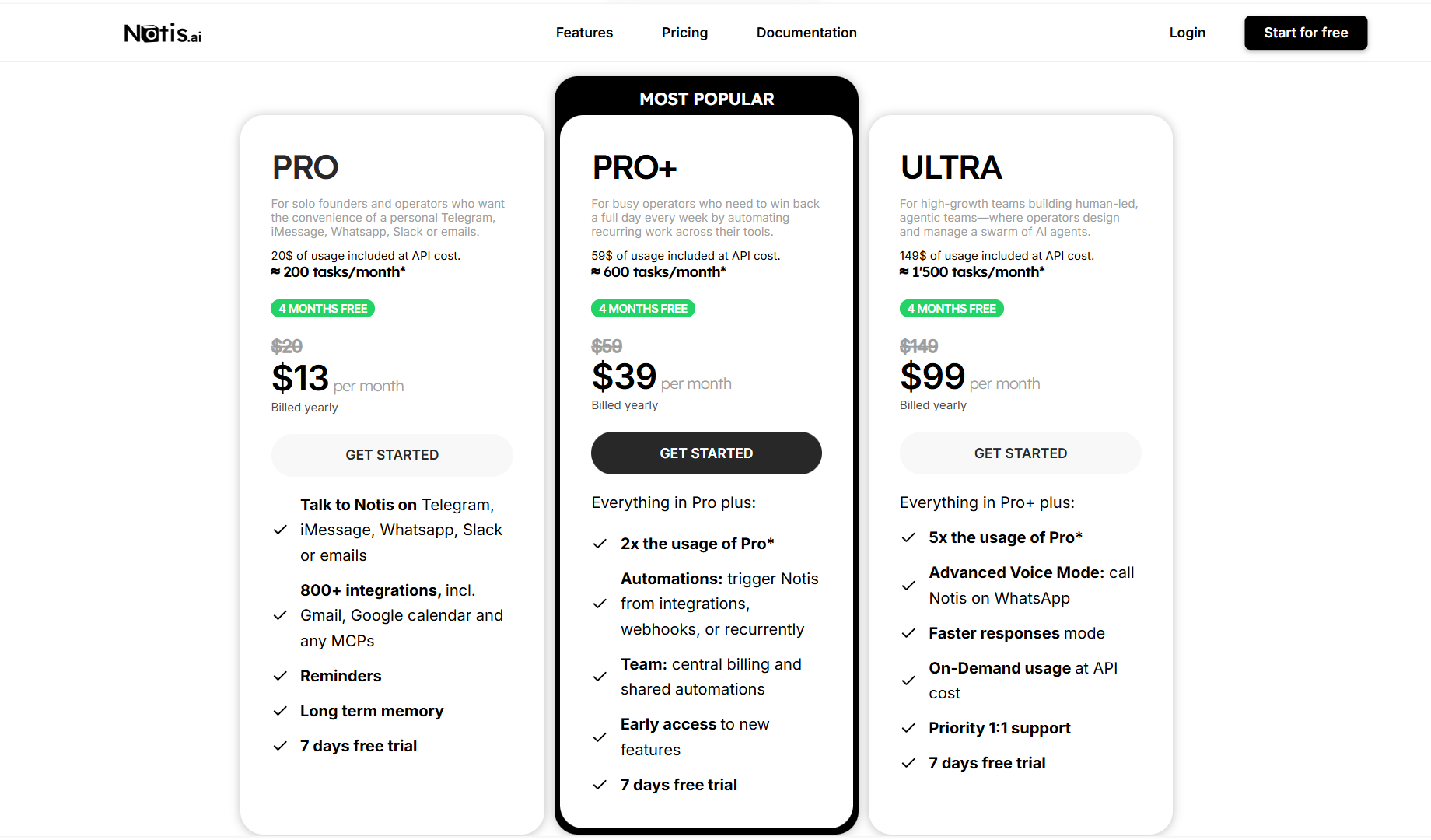
Three tiers, billed monthly or annually (annual gives the equivalent of four months free):
Pro at $13/month covers approximately 200 tasks per month. Designed for solo founders and operators. Basic voice-to-Notion capture, messaging channels, memory, and core features. No automations.
Pro+ at $39/month triples usage and adds automations — which is where the "AI intern" promise starts to become real. Early access to new features is included.
Ultra at $99/month gives 7.5 times the usage, Advanced Voice Mode, faster processing, priority support, and on-demand usage billed at API cost. This is the tier for operators who are genuinely running the product as part of a daily high-volume workflow.
The 7-day free trial is available across all plans, but the 5-credit cap means you're testing a stripped-down version of the product. That's a meaningful limitation for anyone trying to evaluate whether the automation features justify the Pro+ or Ultra price point before paying.
Pricing clarity is moderate. The tiers and monthly prices are clearly documented. What counts as one of the ~300 monthly Pro tasks — and how heavy-use patterns like deep research queries or long automations consume that budget — is not clearly explained on the homepage or pricing page. That ambiguity will surface when users hit their limit and don't know why.
Who Is Notis.ai Best For?
- Solo founders and operators who are already committed to Notion and want to extend it with AI execution rather than replace it. The product's entire value proposition compounds when Notion is already populated with meetings, contacts, projects, and history. The more you've built in Notion, the more Notis can do with it.
- Content-heavy operators — newsletter writers, solopreneurs managing a personal brand, founders posting regularly — who want to capture ideas on the go and route them into a production pipeline without manual reformatting.
- Operators running small teams without admin or EA support who want to automate the operational friction that would otherwise require a junior hire — CRM updates, expense logging, meeting notes, weekly planning.
- Mobile-first professionals who find the desktop-centric design of most productivity tools genuinely limiting. If you spend most of your working day away from a desk, the messaging-native interface is a real advantage.
Who Should Avoid Notis.ai?
- Anyone who doesn't use Notion and has no interest in adopting it. The memory layer, the output layer, and the workspace intelligence all disappear without it. What's left is a voice transcription relay with a monthly subscription — and far cheaper tools do just that.
- Highly price-sensitive solo users who need extended evaluation time before committing. A 5-credit trial cap is not enough to test complex automations or realistic multi-step workflows. You're being asked to pay before you've seen what the product actually does under real conditions.
- Teams with compliance or governance requirements. Notis's security documentation exists but isn't prominently detailed in public materials. Voice data routes through WhatsApp or Telegram APIs and OpenAI models. For teams handling sensitive information, that chain of custody needs more than a brief help center note.
- Users who want guaranteed task execution in high-stakes workflows. Notis is an AI agent and shares the category's fundamental reliability ceiling. Automations are improving, but the February 2026 changelog being branded "Reliability Month" is a reminder that consistent execution is still being actively earned, not assumed.
Strengths
- It removes the interface switching problem. Most productivity tools require you to adopt a new app and build new habits. Notis is already in your WhatsApp. That is a structural adoption advantage that most competitors don't have. The first-use friction is genuinely lower.
- The Notion integration goes deeper than write-only. Notis reads your existing workspace, queries your databases, and uses your content to inform new writing. That's a meaningful technical investment that separates it from tools that just push data to Notion without understanding what's already there.
- Active, transparent development. The changelog is detailed, honest about failures, and consistent. That signals a product team paying attention to real-world reliability issues rather than just shipping features. For a solo-founder product, the release cadence is impressive.
- The pre-built system lowers the floor. Operators who want a full Notion-based productivity setup without building it themselves get one out of the box. That's a genuine onboarding shortcut.
- Predictable pricing in a world of unpredictable AI credit models. Compared to Notion Custom Agents' credit-based system — where two similar agents can burn very different amounts of credits — Notis's flat monthly tiers are easier to budget around.
Weaknesses
- The product only fully works if you're a Notion user. That's not a minor caveat. It's the core dependency. Anyone outside the Notion ecosystem gets a fraction of the product. The homepage doesn't make this limitation prominent enough.
- The trial is functionally too shallow. Five credits is not enough to evaluate automations, multi-step workflows, or the long-term memory features that are the product's real differentiators. You're committing $19-39/month before the product has had a chance to prove its worth in a real workflow. That's a trust gap that some prospective buyers will reasonably refuse to bridge.
- Pricing history is unsettled. The product has gone through at least three visible pricing restructurings. The founder's own changelog notes that the previous unlimited model became unsustainable because some users were spending $60/month in OpenAI credits. The new tiered model is more honest about costs, but buyers who commit to annual plans at current rates are betting on pricing stability that the history doesn't fully guarantee.
- The automations ceiling is real but hard to reach. The most compelling use cases — the competitor research pipeline, the calendar travel blocker, the post-call CRM update — require genuine setup effort, integration configuration, and webhook management. The headline "fire and forget" simplicity applies to basic tasks. Getting to meaningful automation requires work that the product positioning undersells.
- 850+ integrations is a vendor number, not a reliability number. The February 2026 bug fix sprint included OAuth failures, integration edge cases, and authentication issues. How many of those 850+ integrations work smoothly in a real workflow versus technically existing is genuinely unclear. That matters when a buyer is evaluating whether to automate something they currently rely on.
How Notis.ai Compares With Alternatives
- Against Notion's native AI and Custom Agents: The most direct comparison. Notion AI is built into the workspace and launched Custom Agents in September 2025, but access to agents requires the Business plan ($20/user/month minimum) and billing works on a variable credit system. Notis's argument is that its flat-rate model is more cost-predictable and that its messaging-native, voice-first interface is something Notion AI simply doesn't offer. That argument is credible for solo operators. For teams already paying for Notion Business, the calculus gets murkier — they're already paying for Notion AI and adding another $19-99/month on top.
- Against Mem.ai: Mem is an AI knowledge management tool with strong automatic note linking and recall, but it's a standalone app rather than a messaging-native agent. The products compete for the "don't lose your thoughts" use case. Notis wins on execution and task automation; Mem wins on standalone knowledge graph features without requiring Notion.
- Against Lindy AI: Lindy focuses on email triage, scheduling, and workflow automation via a dedicated interface and email integration. It doesn't require Notion and is stronger for email-centric workflows. Notis is stronger for Notion-centric operators who want voice-first, mobile-first capture.
- Against Alfred (get-alfred.ai): Alfred is messaging-native personal AI focused heavily on email management. The surface-level similarity is real — both live in your messaging apps — but the underlying architecture and Notion integration depth are meaningfully different. Notis is the stronger choice for operators whose workflow hub is Notion.
The honest competitive position: Notis is most defensible against users for whom Notion is central, messaging apps are primary, and the phone is the main work surface. Outside that profile, competitors with less dependency on any single workspace tool become more attractive.
Final Verdict
Notis is a genuinely interesting product with a real structural insight: if you want people to use an AI assistant daily, it should live where they already are, not in another app they have to remember to open.
The product is most compelling for solo founders and operators who have invested in Notion and want AI execution layered on top of it — specifically for mobile voice capture, content production, and recurring operational automation. In that profile, the combination of messaging-native input, deep Notion integration, and flat-rate pricing is a credible value proposition.
The weaknesses are real and worth naming honestly. The product only earns its full value inside the Notion ecosystem — buyers without that dependency should look elsewhere. The 5-credit trial doesn't give enough room to test the features that actually justify the price. And the pricing history suggests a product still finding its sustainable unit economics, which adds some long-term commitment risk for annual subscribers.
For a solo founder spending hours a week on manual note-taking, meeting summaries, and content reformatting — who already lives in WhatsApp and Notion — Notis is worth a trial. The gap between what it can do and what it actually delivers in daily use depends entirely on how much setup effort you're willing to invest. The product is most valuable when it's well-configured. Out of the box, it's impressive. Fully deployed, it starts to look like an actual lever.
For anyone outside the Notion ecosystem, or anyone who needs a minimal evaluation period before committing financially, the current onboarding structure makes it harder to give a clean recommendation. The product is good enough to be worth trying. The trial terms don't make trying easy enough.
FAQ
What is Notis.ai used for?
Notis is an AI agent that operates inside WhatsApp, Telegram, iMessage, Slack, and email. It accepts voice notes, text messages, and forwarded documents, then transcribes, organizes, drafts, and executes tasks — saving output to your Notion workspace. Common uses include voice-to-note capture, meeting transcription, content drafting, CRM updates, and recurring workflow automation.
How does Notis.ai work?
You send Notis a message in your preferred messaging app — a voice note, a text instruction, or a forwarded file. Notis processes the input using a multi-agent AI system, references your Notion workspace for context and memory, executes the requested task, and saves structured output back to the correct Notion database or page. Automations can extend this to scheduled and trigger-based execution without manual input.
Who should use Notis.ai?
Notis is best suited to solo founders and operators who are committed Notion users and want to extend their workspace with AI execution via voice and messaging apps. It's particularly useful for mobile-heavy professionals, content operators, and anyone running lean without admin or EA support.
Does Notis.ai offer a free plan or trial?
There is no free plan. A 7-day free trial is available, but it is limited to a 5-credit usage cap — which is not enough to evaluate complex automations or multi-step workflows. The entry plan is $19/month.
What are the main alternatives to Notis.ai?
Realistic alternatives include Notion AI and Custom Agents (native to the workspace but more expensive at scale and without messaging-native input), Mem.ai (stronger for standalone knowledge management without Notion dependency), Lindy AI (better for email and calendar automation), and Alfred (messaging-native but email-focused without Notion depth).
Does Notis.ai work without Notion?
Not meaningfully. The product's memory system, output layer, and workspace intelligence all depend on a connected Notion workspace. Without Notion, Notis loses the capabilities that differentiate it from basic voice transcription tools.
Disclosure: This article may contain affiliate links. If you sign up through them, Coin360 may earn a commission at no extra cost to you. That does not affect our editorial standards, and reviews are written to prioritize accuracy, usefulness, and reader value.


