




 USD
USD


/ 10

Summary
This review breaks down pagergpt’s action-capable AI agents, session-based pricing, and where it still falls short—covering setup, real use cases, and whether it’s ready for serious support workloads.
Pros
Cons
pagergpt Review Scores
pagergpt Review: Fast AI Support Automation With Action-Capable Agents
Most AI customer support tools make the same pitch: connect your knowledge base, deploy a bot, cut ticket volume. pagergpt makes that pitch too. What makes it worth examining is that it adds something most chatbot builders skip — agents that can actually do things, not just answer questions. Whether that capability holds up at the price and maturity level on offer is the real question.
What Is pagergpt?
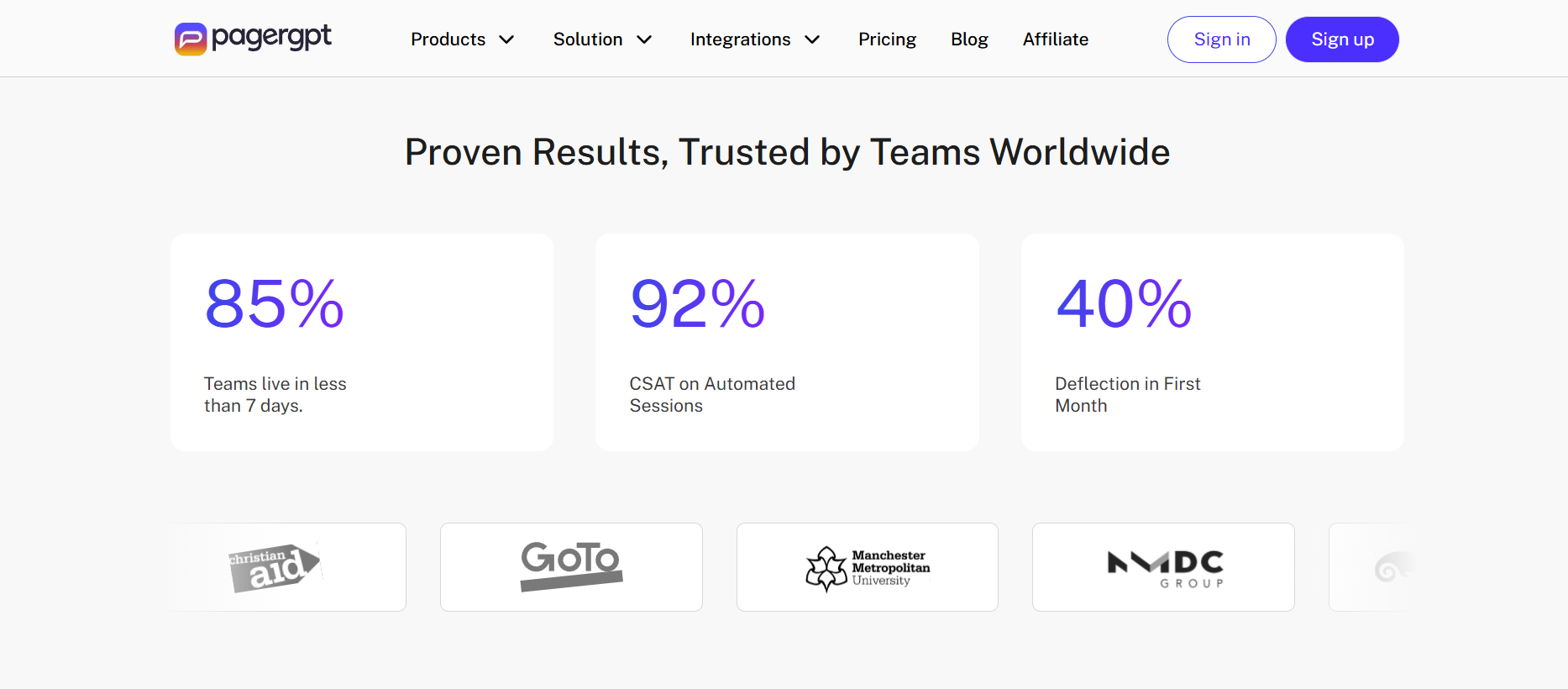
pagergpt is a no-code AI agent builder built specifically for customer support automation. It is not a general-purpose chatbot tool or a workflow automation platform in the Zapier sense. The focus is customer-facing conversations — handling queries, executing support actions, and routing to human agents when the situation demands it.
The problem it is solving is concrete: support teams spending most of their time on the same fifty questions, with no way to scale resolution capacity without hiring more people. pagergpt tries to close that gap by training AI agents on a business's own documentation, policies, and connected systems, then deploying those agents across website chat, WhatsApp, Slack, and other messaging channels.
The category is customer support agent. It crosses into multi-agent territory because of its sub-agent RAG architecture — different sub-agents handle different knowledge retrieval tasks — but the primary product identity is a customer support automation platform. That positioning shapes everything: the interface, the default use cases, the integrations, and the pricing logic.
How Does pagergpt Work?
The workflow is straightforward in principle. You connect a knowledge source — your website URL, uploaded documents, a Notion workspace, a Zendesk help center, Google Drive — and pagergpt trains an agent on that content. You then configure the agent's name, tone, and purpose inside what the platform calls the Agent Studio. Connect the integrations you need (Stripe for payments, Calendly for bookings, HubSpot for leads), then deploy the agent to your channel of choice.
What separates pagergpt from a standard RAG chatbot is the action layer. The agent is not just retrieving and presenting text. With the right integrations in place, it can process a return, update a subscription, apply a discount code, and book a follow-up appointment within a single conversation. A multi-step e-commerce workflow — account update, refund trigger, discount application — runs without requiring a human handoff. That loop actually closes, which is more than most tools at this price point deliver.
When the agent hits a query it cannot handle — or when a customer needs a human — it routes the conversation to a shared live inbox where your team picks it up without losing conversation context.
The execution model is agentic, meaning the system reasons across multi-turn conversations and makes decisions about when to retrieve information, when to trigger an action, and when to escalate. How reliably that reasoning holds in edge cases is where things get more complicated, and we will get to that.
Key Features
- Action-capable agents. The workflow execution piece is genuinely differentiated. Most no-code chatbot builders retrieve text and display it. pagergpt's agents can take actions on connected systems. For e-commerce support teams, that closes the loop on the most common frustrating moment: a customer asks for a refund, the bot explains the policy, and then nothing actually happens. pagergpt is built to take the next step.
- Multi-LLM selection. You can choose which underlying model powers your agent: OpenAI, Gemini, Mistral, or Claude. That is useful both for teams that have model preferences and for enterprises managing AI risk by avoiding single-vendor dependency. Most no-code support tools lock you to one provider.
- Session-based pricing. A session is a full conversation, however long. There is no per-message meter running. For support teams handling complex multi-turn queries, this matters — you are not incentivized to cut conversations short or worried about a particularly chatty customer session blowing your budget.
- Built-in live chat inbox with human escalation. The handoff to humans is built into the core product, not outsourced to a third-party integration. Context carries across. For smaller teams, this removes a meaningful integration burden.
- 95+ languages. Automatic language detection and response. For international businesses, this is a legitimate differentiator — localized support at scale without maintaining separate regional agents.
- Security certifications. ISO/IEC 27001:2013 certified, SOC II audited, GDPR compliant. For a product at this price tier and apparent company size, that is a credible security posture and one less thing for enterprise procurement to push back on.
Setup and Onboarding
Getting a basic agent running is genuinely fast. The core loop — create an account, pick a template (e-commerce, support, sales), upload training content, test the agent — works quickly and does not require developer involvement at any point.
The honest version of the onboarding story is a little more layered. Achieving the right behavior — accurate responses, correct workflow triggers, appropriate escalation timing — requires prompt instruction tuning that the platform's marketing does not emphasize. Expect a fast first deployment and a longer iteration cycle before the agent is ready for live traffic. That is not unique to pagergpt; it is the realistic setup story for any RAG-based system. But it is worth calibrating expectations before you go in expecting a polished agent out of the box.
Onboarding support is also gated by plan. Business customers get hands-on onboarding assistance. Starter and Magic plan users get self-serve only. If your team is new to this category of tooling, that tier structure is worth factoring into your actual cost of getting to a working deployment.
Real-World Use Cases
- E-commerce support automation. This is where pagergpt looks strongest. Order tracking, return requests, refund processing, subscription changes — these are high-volume, repetitive, action-requiring queries. pagergpt is built to handle the full loop, not just explain the policy and leave the customer to fill out a form. For a DTC brand processing hundreds of support tickets per week, that is a meaningful operational improvement.
- FAQ deflection at scale. Replacing a static help center with a conversational agent that retrieves the right answer in context is a well-understood win. pagergpt handles this with RAG-grounded responses rather than rigid decision trees. The caveat is that hallucination risk exists and needs active monitoring, which we cover in the weaknesses section.
- Lead capture via conversation. pagergpt includes granular lead capture fields designed for sales pipeline use. For businesses where the support chat widget also serves as a sales entry point — SaaS trial signups, service inquiries — this dual function reduces the need for a separate lead gen tool.
- Multilingual global support. If your customer base spans multiple languages and you cannot afford to build separate support agents for each market, the 95-language automatic detection is a legitimate operational shortcut.
- Internal knowledge retrieval. The same architecture that handles customer queries can handle employee queries against internal documentation. pagergpt does not lead with this use case, but it follows naturally from the platform's design and is worth considering if you are already paying for Business tier.
Who Is pagergpt Best For?
- SMB and mid-market e-commerce teams handling high inbound query volume around orders, returns, and product questions. The action execution capability is genuinely suited to this workflow, and the session-based pricing scales more predictably than per-message alternatives.
- Non-technical support operators who need to move fast without engineering involvement. The no-code setup is real — you do not need a developer to deploy a functional agent.
- International businesses that need multilingual support without building separate configurations for each language. The 95-language automatic detection is operationally valuable here.
- Teams that want one platform for AI automation, live chat inbox, and basic analytics, rather than stitching together three separate tools.
- Businesses that can tolerate some setup iteration. pagergpt rewards buyers who are willing to tune the agent after initial deployment. If you need a fully polished agent from day one with minimal supervision, the platform is not quite there yet.
Who Should Avoid pagergpt?
- Enterprise buyers with serious identity management requirements. SSO is listed as coming soon. RBAC is available at Enterprise tier, but if your IT governance requires SSO as a baseline, you are not there yet.
- Technical teams that need API access. Public API availability is unconfirmed. If your team needs custom integration beyond the native connector list, verify this directly before committing.
- Buyers who require independent validation before spending. The third-party review base is essentially empty. There are no meaningful user reviews on G2, Capterra, or Product Hunt as of mid-2026. Asking a team to commit $349/month to a platform with no verified user review track record is a real trust hurdle that buyers should not brush past.
- Price-sensitive solo operators or very small teams. The Magic free plan's 100 sessions/month is not enough for real workload validation. The Starter plan at $99/month gives you more room but limited onboarding support. If you are a one-person operation, the risk-adjusted value is harder to justify at Business tier without more proven ground beneath you.
- Anyone who needs voice support. pagergpt is text and messaging-only. No voice agent or IVR capability is documented.
Strengths
- The action layer is real, not a marketing slide. pagergpt's agents can execute multi-step workflows — not just retrieve text but update accounts, process actions, and complete transactions within a single conversation. That is a meaningful distinction from the sea of RAG chatbots that display information and call it automation.
- Security certifications punch above the platform's weight class. ISO 27001 and SOC II are not trivial to obtain or maintain. For a platform in this price range, they provide a compliance baseline that larger enterprise buyers will notice and smaller buyers will benefit from quietly.
- Multi-LLM flexibility is a genuine differentiator. The ability to choose your underlying model — and switch — is not standard at this tier. For teams with model preferences or risk concerns around single-provider dependency, this is useful optionality.
- Session-based pricing is a smarter structure for support teams. Long customer conversations should not cost more than short ones. The session model aligns the pricing logic with actual support workflows in a way that per-message billing does not.
- The live inbox removes a common integration headache. Built-in human escalation with context retention means you do not need to wire a separate live chat tool alongside the AI layer. For teams moving fast, that simplification has real value.
Weaknesses
- Hallucination risk exists and is not fully managed out of the box. The RAG architecture reduces but does not eliminate hallucinations. For a platform positioning itself as enterprise-ready and targeting support workflows where wrong answers have real consequences — incorrect refund information, bad policy guidance — this is not a footnote. It requires active monitoring and a clear escalation path for edge cases.
- The third-party review gap is the biggest credibility issue. pagergpt's entire online footprint is dominated by content it has written about itself — dozens of competitor comparison articles that position pagergpt favorably, published on its own blog. That content strategy is understandable commercially, but it means buyers cannot easily find unfiltered user experience. One independent review does not constitute a trust base for a $349/month commitment, and that is exactly where the product sits right now.
- Documentation quality is thin. pagergpt's own published content acknowledges limited documentation as a product weakness. For buyers who need to self-serve their way through complex setup or troubleshooting, this is a real friction point.
- The pricing jump is steep without enough to support it. Going from a 100-session free plan to a $349/month Business plan is a significant commitment. The Starter plan at $99/month sits in the middle but its session limits and inclusions are underspecified in public documentation — which makes cost forecasting harder than it should be.
- Enterprise completeness is still a work in progress. SSO is not yet available. API availability is unclear. These are not minor gaps for buyers evaluating enterprise suitability.
Pricing and Plans
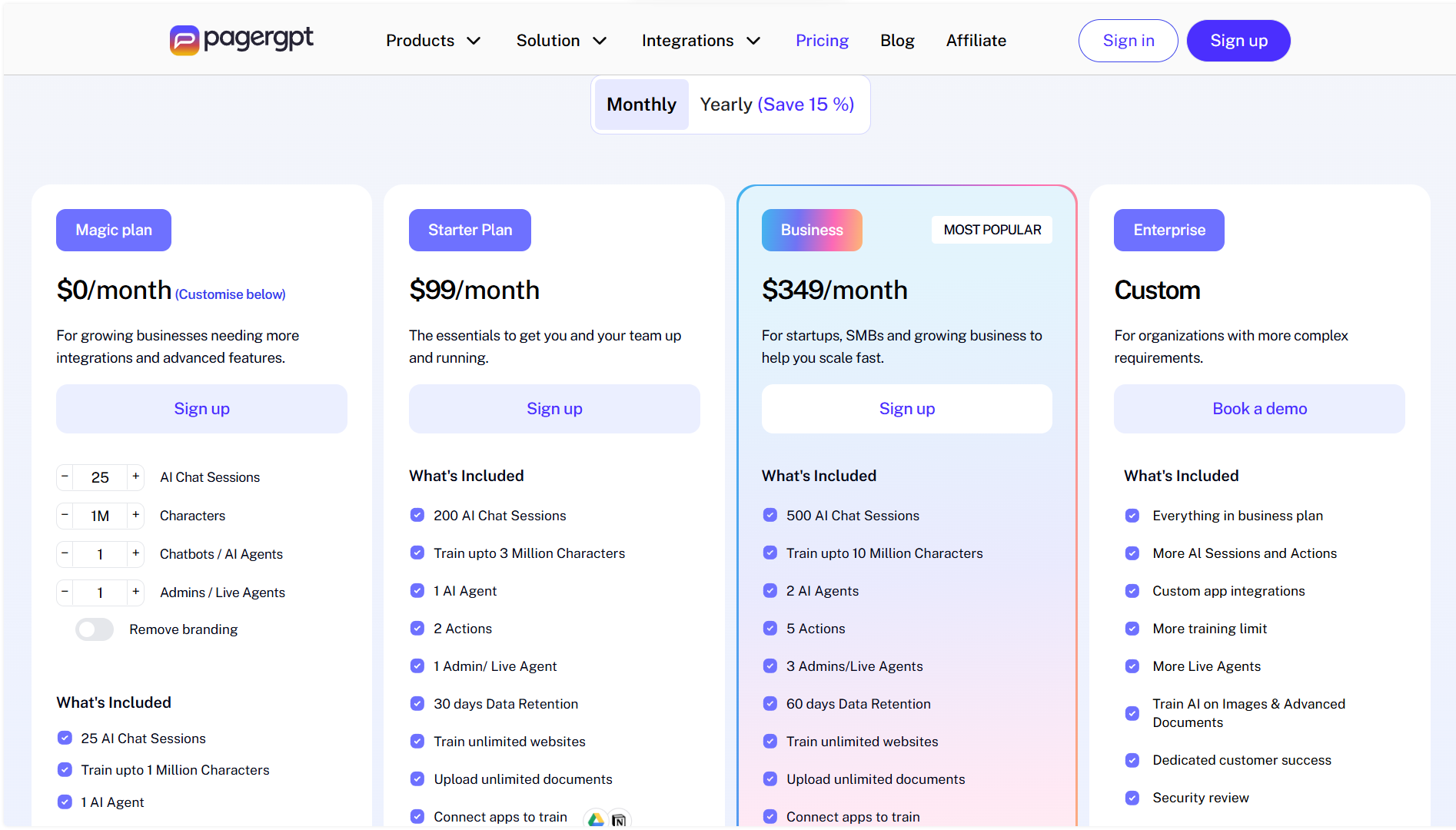
pagergpt uses a session-based model. A session is a full conversation — one customer, one interaction, as many messages as needed. You are not penalized for long conversations, which is a rational structure for support teams.
The tier breakdown: the Magic Plan at $0/month covers 100 sessions, one chatbot, one admin account, and a 1M character training limit. Enough to test the platform, not enough to run real workloads. Branding removal is not included.
The Starter plan runs $99/month. Specific session limits for this tier are not clearly published — a gap in pricing transparency that matters when you are sizing up cost before committing.
The Business plan at $349/month is the main commercial tier: 1,000 sessions/month, two chatbots, five admin accounts, 50M character training limit, full integrations, and onboarding support.
Enterprise pricing is custom. SSO is listed as coming soon; RBAC and a dedicated CSM are included.
The session model is sensible. The honest note is that the gap between a barely functional free plan and a $349/month Business tier is steep, and the middle ground is underspecified. Get a clear breakdown of the Starter plan's actual limits directly from the pagergpt team before using it as a decision point.
How pagergpt Compares With Alternatives
- Intercom Fin AI is the most commonly benchmarked competitor, and the comparison is meaningful. Fin uses outcome-based pricing — you pay per successful resolution. That sounds fair until your resolution volume spikes unpredictably and your bill follows. pagergpt's session model is more forecastable. The trade-off is that Intercom carries years of enterprise customer validation, deep helpdesk integrations, and a review ecosystem that pagergpt simply does not have yet. Pricing predictability goes to pagergpt. Trust and maturity go to Intercom.
- Chatbase is the closest structural analog — no-code, knowledge-base-trained, SMB-focused. Chatbase uses credit-based per-message pricing, which creates overage risk at scale. pagergpt's session model is more rational for support teams. Chatbase has more verified user reviews. Neither platform has overwhelming third-party validation, but Chatbase has more of a track record.
- Tidio is the practical choice for SMB e-commerce teams that want proven, well-reviewed live chat plus AI automation. It is less ambitious on the agentic action side, but it has a substantially larger verified user base and cleaner onboarding documentation. If independent validation matters to your buying process, Tidio is the safer bet at this size.
- Botpress serves a completely different buyer — developer teams that want full control over agent logic and custom deployment. If you need a no-code path, Botpress is not the answer. If your team has engineering resources and wants something sophisticated, pagergpt's rigid no-code structure will frustrate you before long.
The honest summary: pagergpt is most compelling as a Chatbase or Tidio alternative for teams that prioritize action execution and session-based pricing. It is less compelling as an Intercom alternative until its enterprise feature set is complete and its review base exists.
Final Verdict
pagergpt is a genuinely capable no-code customer support agent platform with a feature set that goes beyond most competitors at its price point. The action execution layer is real. The security certifications are meaningful. The multi-LLM flexibility is useful. The session-based pricing makes more sense for support teams than the alternatives.
The problem is that pagergpt is asking buyers to take it largely on its own word. Its online presence is almost entirely self-authored content. Its third-party review base is nearly empty. Its documentation is self-described as limited. It is pitching at Business customers with a $349/month entry point while offering little independent validation that the platform delivers reliably at that scale.
That is not a reason to dismiss it. It is a reason to proceed with clear eyes.
- For SMB e-commerce teams that need agentic support automation without developer involvement, pagergpt is worth a structured trial on the Magic or Starter plan. Get the agent running on real queries before committing to Business tier. Monitor hallucination rates. Verify that the integrations you need work as advertised.
- For mid-market teams with compliance requirements or complex setups, wait until SSO is live and API availability is confirmed.
- For enterprise buyers, the security posture is respectable. The feature completeness is not there yet.
The core tradeoff is simple: you are getting a capable, well-designed platform from a company that has not yet built the trust infrastructure its pricing requires. That gap can close. It has not closed yet.
FAQ
- What is pagergpt used for?
pagergpt is used to build and deploy AI agents that handle customer support queries automatically. It is designed for teams that want to automate repetitive support interactions — order tracking, returns, FAQs, refunds — across website chat, WhatsApp, Slack, and other messaging channels, without writing code.
- How does pagergpt work?
You connect a knowledge source (your website, documents, or tools like Notion and Zendesk), configure an agent's tone and behavior in the Agent Studio, add integrations for action execution (Stripe, Calendly, HubSpot), and deploy to your channel. The agent uses retrieval-augmented generation to answer queries from your content and can take actions on connected systems when needed.
- Who should use pagergpt?
pagergpt fits best for SMB and mid-market e-commerce and SaaS support teams handling high volumes of repetitive queries, needing multilingual coverage, and wanting an agent that can execute real actions rather than just answer questions. Non-technical operators who need a no-code solution will find the setup accessible.
- Does pagergpt offer a free plan or trial?
There is a free Magic Plan at $0/month, which includes 100 sessions, one chatbot, and one admin account. It is enough to test the platform but not enough to run real support workloads. Paid plans start at $99/month (Starter) and $349/month (Business).
- What are the main alternatives to pagergpt?
The most direct alternatives are Chatbase (no-code knowledge-base chatbot builder), Tidio (SMB live chat plus AI, stronger review base), and Intercom Fin AI (enterprise-focused with outcome-based pricing). For developer-controlled agent building, Botpress is a separate option. Each carries different pricing models, maturity levels, and buyer profiles.
- Is pagergpt enterprise-ready?
Partially. ISO 27001 and SOC II certifications are in place. However, SSO is not yet available, API access is unconfirmed, and the independent review base is near-empty. Enterprise buyers with strict identity management requirements or those who depend on third-party procurement validation should wait until these gaps close.
Verdict at a Glance
- Best for: SMB and mid-market e-commerce and SaaS teams that need agentic customer support automation without developer involvement
- Not ideal for: Enterprise buyers needing SSO, teams that require API access, or buyers who need strong independent validation before committing
- Core strength: Action-capable agents that execute real workflows, not just retrieve text answers
- Main tradeoff: Capable platform with thin third-party trust signals asking for a meaningful budget commitment — the pricing is ahead of the verified review base
- Bottom line: pagergpt is worth a structured trial if you are in the right use case, but validate performance on your actual queries before upgrading to a paid tier.
Disclosure: This article may contain affiliate links. If you sign up through them, Coin360 may earn a commission at no extra cost to you. That does not affect our editorial standards, and reviews are written to prioritize accuracy, usefulness, and reader value.


