




 USD
USD

/ 10

Summary
This review breaks down where Rytr actually delivers value: short-form copy, editing tools, templates, and affordability — while explaining the real limitations.
Pros
Cons
Rytr Review Scores
Rytr Review: Affordable AI Writing Assistant or Just Cheap?
Rytr has been around long enough to build a real user base — over eight million accounts and ratings above 4.7 on the review marketplace G2. For a tool priced below ten dollars a month, that kind of adoption isn't nothing. But the pitch deserves scrutiny, because what Rytr actually is and what people sometimes expect it to be are two different things.
This is not an AI agent. It is not going to research your topic, pull live data, run multi-step workflows, or do anything autonomously. What it does — and does pretty well within its lane — is help you generate short-to-medium-form copy faster using a template library, tone controls, and a set of editing tools that turn out to be more useful than they first appear.
Whether that's worth your money depends entirely on what you're trying to do.
What Is Rytr?
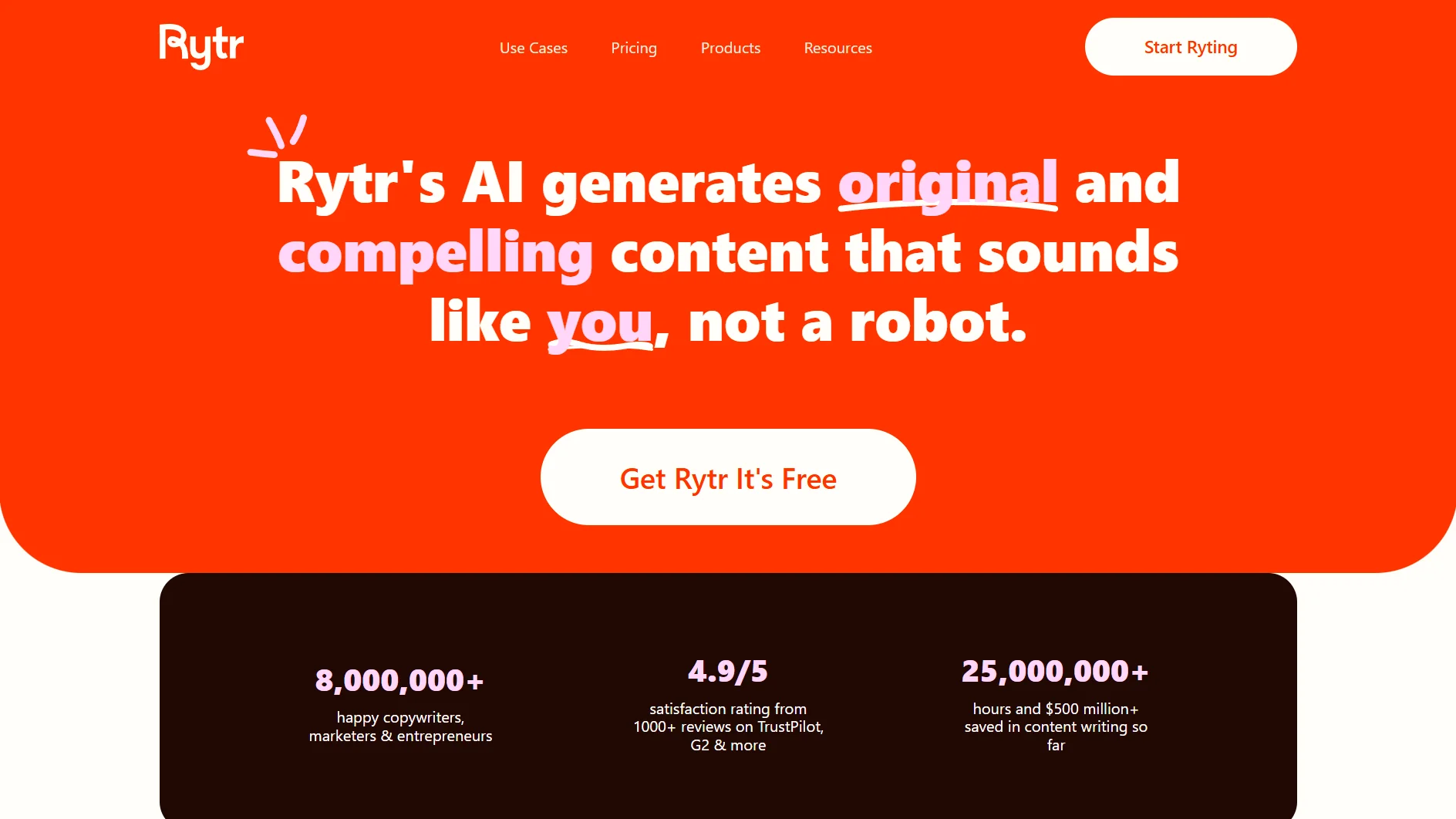
Rytr is a template-based AI writing assistant. You pick a content type from a library of 40+ use cases — blog outlines, email copy, product descriptions, social captions, SEO meta titles, call-to-action variations, and more — feed it a short prompt, and it generates variants you can work with.
That's the product. It's not an agent, not a research tool, not a long-form content engine. It sits in the same category as early Copy.ai or the simpler end of Jasper: a tool for people who need to produce copy faster and more consistently than writing from scratch, without paying premium-tier prices.
The primary problem it solves is friction on repetitive copywriting tasks. If you're a solo operator writing product descriptions, a freelancer managing social content for multiple clients, or a small business owner assembling email sequences, Rytr is designed to remove the blank-page problem at a price point most solo operators can justify.
What it is not designed for — regardless of how it gets described — is autonomous AI-driven workflow execution. Any reader coming in expecting that will be disappointed fast.
How Does Rytr Work?
The workflow is straightforward. You open the editor, select a use case from the template library, choose a language and tone, write a brief context input, pick a creativity level and the number of output variants (up to three), and hit generate.
From there, the output lands in an editable rich text workspace. You can accept it, refine it manually, or apply one of Rytr's built-in editing functions:
- Rewrite restructures the text while preserving meaning
- Improve polishes phrasing and tone
- Expand adds length or depth to a passage
- Shorten condenses it
There's also a grammar checker and a plagiarism check (powered by Copyscape) available on paid plans.
The Chrome Extension extends this same flow to any browser-based environment — Gmail, a CMS, a social scheduling tool, wherever you happen to be typing.
What you don't get is anything happening without you. Every generation step requires a deliberate prompt. There's no agent loop, no background processing, no autonomous research. Rytr is a prompt-and-generate tool with editing layers built on top. That's it. The upside is that it's immediately legible — there's nothing technically complex to grasp and almost no learning curve. The downside is a ceiling: the tool's usefulness scales with how much you put in, not how much it figures out on its own.
Key Features
- Template library (40+ use cases). The most practically useful part of the product. Instead of wrestling with a blank prompt box, users select a specific content type — blog idea, product description, email subject line, CTA copy, reply to a review, interview questions — and the template structures the generation request for them. For non-expert users or anyone operating under time pressure, this scaffolding is genuinely valuable.
- Write in 35+ languages. Rytr supports content generation in 35+ languages, including English, Spanish, French, German, Italian, Portuguese, Dutch, Hindi, Arabic, Chinese, Japanese, Korean, and others. The catch is tier access: Free and Unlimited users can use only one selected language, while Premium unlocks access to all supported languages. That makes the feature valuable, but not equally available across plans.
- 20+ tones. Rytr lets users customize output across 20+ preset tones, including convincing, awestruck, inspirational, etc. This is one of Rytr’s more practical advantages over a blank AI prompt box because non-expert users can steer voice without manually writing tone instructions every time.
- My Voice (custom tone matching). Rytr analyzes a writing sample you provide and builds a custom tone profile that gets applied to future generations. The Unlimited plan supports one custom voice; Premium supports five. The five-voice limit on Premium is the feature most relevant to freelancers managing multiple brands, and it's one of the stronger product-fit arguments for that tier.
- Editing tools: Rewrite, Improve, Expand, Shorten. This is where the product earns more respect than its generation tools alone would suggest. In practice, applying these functions to rough human-written copy often produces cleaner results than generating from scratch. If your workflow involves editing your own drafts rather than generating everything from nothing, these tools are quietly excellent — particularly Rewrite and Improve on short passages.
- Plagiarism checker (Copyscape). Built-in and integrated, which is a convenience most standalone tools don't offer at this price. The monthly caps (50 checks on Unlimited, 100 on Premium) are real constraints for high-volume operations, but for individual creators producing moderate output, it covers the bases.
- API with usage-based pricing. The API is public, documented on GitHub, and priced per character — 10,000 characters free, then sliding tiers from $0.75/10,000 characters down to $0.60 at very high volume. For a small SaaS product or indie developer wanting to embed AI writing assistance, this is a practical entry point without a heavyweight pricing commitment.
What's not a standout feature: long-form document generation. Rytr has a workspace for assembling longer content, but it works section by section through repeated prompting, and output coherence degrades over length. The tool isn't built for publishing a 2,000-word article from a single input, and positioning it that way creates problems.
Setup and Onboarding
Fast. Free plan requires no credit card. Account creation takes under two minutes, and a short tutorial video appears on first login. Most users can generate their first piece of usable content within five minutes of signup.
That low-friction entry is a genuine product advantage — especially against tools that require demo calls, lengthy setup, or technical configuration before delivering any value.
The Chrome Extension installs from the Chrome Web Store and requires no configuration beyond authentication. It works.
For the API, the GitHub documentation is public and reasonably clear, though it targets developers — it's not the kind of setup that a non-technical user would navigate without some comfort with REST calls. The claim that API integration is "ready in three minutes" is generous unless you're already comfortable with that workflow.
One thing worth noting: the use cases page on the official site is currently under construction. For new users trying to understand the full template library before signing up, that's a gap.
Real-World Use Cases
The use cases where Rytr looks strongest are high-frequency, short-form, moderate-quality content tasks. Not everything — the specific ones.
- Email copy and subject lines. This is probably Rytr's cleanest fit. Generating multiple email subject line variants or drafting a promotional email body with a specific tone is fast, repeatable, and produces output that usually needs only light editing.
- Social media captions and post ideas. Same logic. Volume tasks where having a starting point is more valuable than having a perfect first draft. The tone controls matter here — being able to generate "convincing" versus "casual" variants of the same idea for different platforms saves real time.
- Product descriptions for ecommerce. Repeatable, template-driven, moderate-quality required. Rytr handles this well. A seller managing dozens of product listings can generate first drafts in bulk and edit them into shape.
- Blog outlines and idea generation. Useful for breaking through creative blocks and structuring an article direction. Rytr won't write you a research-backed blog post, but it will give you a serviceable outline and a set of section ideas that you can build from.
- Rewriting and improving existing drafts. Arguably the strongest actual use case for experienced writers. Feed in a rough paragraph, apply Improve or Rewrite, and the output is frequently cleaner than the original. Writers who aren't looking for AI to replace their thinking but want a polish layer will find real value here.
What Rytr is not well-suited for: content that requires verified facts, current data, nuanced analysis, or consistent tone across long documents. Those jobs need a different tool or a different workflow.
Who Is Rytr Best For?
- Solo freelancers managing two to five clients who need to produce short-form copy across email, social, and web without paying for a premium subscription. The five custom voice profiles on Premium make it viable for managing distinct brand voices across clients.
- Solopreneurs and small ecommerce operators writing product descriptions, ad copy, and email sequences on a tight budget. At $7.50 a month, the price-to-utility math is difficult to argue with for that volume of use.
- Bloggers and content creators who want AI-assisted first drafts and editing support rather than full article automation. The setup is minimal, the template scaffolding reduces the thinking required to get started, and the editing tools improve what you've already written.
- Developers or small SaaS teams who want to embed AI-assisted writing into their product at low per-unit cost. The API pricing is transparent and scales predictably.
Who Should Avoid Rytr?
- Anyone expecting an AI agent. If you want a tool that researches topics, pulls real-time data, executes multi-step workflows autonomously, or makes decisions without constant user input, Rytr is not that product and will not become that product based on its current architecture.
- Content teams producing long-form, research-backed SEO articles at scale. Rytr cannot source current information, cannot cite evidence, and cannot maintain tone coherence across a full article. These are not edge-case failures — they are structural limitations of the product type.
- Enterprises needing team collaboration, governance controls, admin dashboards, or usage oversight. There is no documented team plan, no multi-seat structure, and no collaboration features. The product is built for individual users.
- Non-English speakers on the Free or Unlimited tier. Language breadth is locked to one language until Premium, which removes one of the core value arguments for budget-conscious users who aren't working in English.
- High-volume content operations that will exhaust the plagiarism check caps monthly. Fifty or a hundred Copyscape checks per month is fine for individual creators; it's a real constraint for teams running volume.
Strengths
- Price-to-utility ratio at the individual user level. At $7.50 per month for unlimited generation, Rytr is difficult to undercut. Free plan requires no credit card and covers basic use cases. For solo operators who primarily need short-form copy, the cost is almost a non-issue.
- Template scaffolding lowers the blank-page barrier meaningfully. Not everyone is good at writing prompts. The 40+ use case templates translate a vague content need — "I need an email for this product launch" — into a structured generation request that actually produces something usable. This is a real accessibility advantage.
- Editing tools punch above the price point. Rewrite, Improve, Expand, and Shorten are more effective than the generation features alone would suggest. For writers who want a polish layer on their own drafts rather than full AI generation, these tools justify the subscription independently of the templates.
- Genuinely fast time to first value. No onboarding call, no configuration, no technical knowledge required. The Chrome Extension works across browser contexts. A new user can be productive within minutes.
- Public API with transparent pricing. The documentation is on GitHub, the endpoint structure is clear, and the per-character pricing tiers are published. That level of transparency is worth something.
Weaknesses
- The product category is routinely misrepresented in how Rytr gets positioned. It is not an AI agent. It is not an autonomous writing tool. The gap between expectation and reality is the single biggest source of user disappointment — visible in the Trustpilot reviews from users who expected more. That's partly a marketing problem, but buyers should calibrate accordingly.
- Long-form content quality is a real limitation, not a caveat. Rytr does not produce publication-ready articles. Output degrades in coherence and tone over length, becomes repetitive, and lacks the factual depth or research integration that meaningful long-form content requires. Users who test it on short copy and then try to use it for full articles will hit this ceiling quickly.
- No real-time research or fact access. The tool generates from its training data. No web access, no SERP data, no citation output. For any content that requires factual accuracy or current information, the user carries the verification burden entirely.
- Multilingual users are penalized at lower tiers. Free and Unlimited restrict output to one language. Unlocking 35+ languages requires the Premium plan. For non-English users, this restructures the pricing calculus significantly.
- No native platform integrations beyond the Chrome Extension. No WordPress plugin, no HubSpot connector, no Notion integration. The Chrome Extension covers a lot of ground functionally, but it's not a substitute for proper integrations in team workflows.
Pricing and Plans
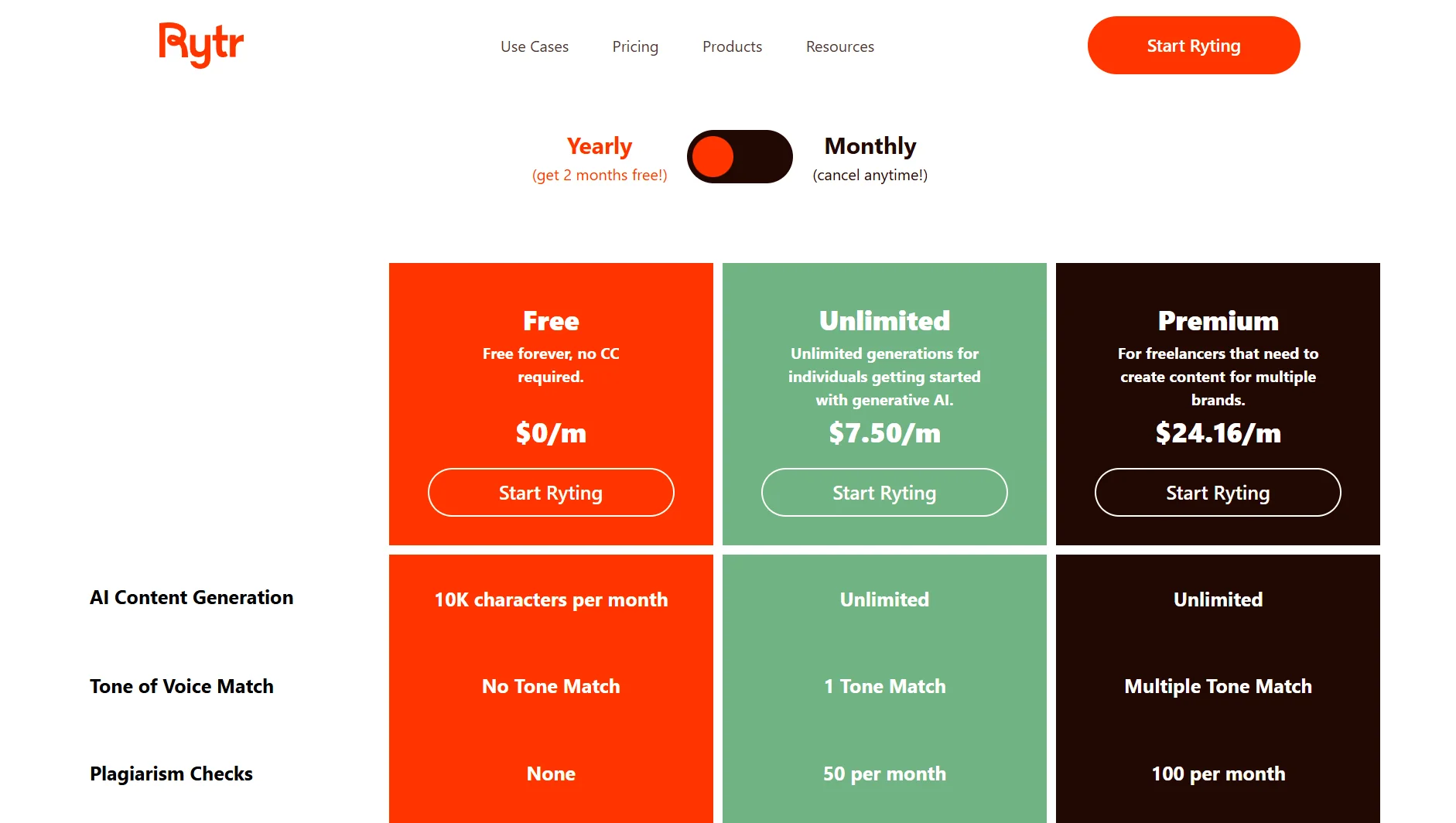
Three tiers. Free forever at $0 with 10,000 characters per month, no credit card required. Unlimited at $7.50 per month on annual billing with unlimited generation and one custom voice. Premium at $24.16 per month on annual billing with five custom voices, 35+ languages, tripled character input limits, and priority support.
The structure is clean. Annual prices are clearly published. The monthly billing option exists but exact monthly rates were not confirmed on the official pricing page at the time of this review — third-party sources suggest around $9 and $29 per month respectively, but treat those as approximate until confirmed.
The annual plan saves roughly 20 percent. The 12-month commitment is noted in the terms of service, and given the refund policy complaints, it's worth reading before locking in annually.
The API is priced separately by usage: 10,000 characters free, then $0.75 per 10,000 up to one million characters, stepping down at higher volumes. Billed in $25 increments. Genuinely transparent pricing for a genuinely practical API.
For the target user — a solo creator doing moderate-volume short-form content — the pricing feels fair and well-structured. For teams or high-volume users, the per-plan caps on plagiarism checks and the absence of any team tier are meaningful constraints.
How Rytr Compares With Alternatives
- Against Jasper: Jasper targets teams and enterprises with stronger long-form workflows, more sophisticated brand voice controls, and collaboration features. It costs significantly more — roughly three to five times the price at mid-tier. For individuals doing short-form copy, Rytr wins on cost and simplicity. For teams who need scale, governance, and long-form reliability, Jasper is more mature.
- Against Copy.ai: The closest product overlap. Copy.ai has evolved toward workflow automation and GTM pipeline features that Rytr doesn't have, but Rytr is simpler to adopt and cheaper. If you need automations connecting CRM, email, and content tools, Copy.ai has more to offer. If you need short-form copy generation with minimal complexity, Rytr is a more direct tool.
- Against Writesonic: Writesonic adds real-time SERP data and search-aware article generation that Rytr doesn't attempt. For content that needs to be factually grounded and SEO-intelligent, Writesonic is better positioned. For pure copy generation at lower cost, Rytr undercuts it on price.
- Against Grammarly: Not a true head-to-head, but there's real overlap in the editing use case. Grammarly is more precise on grammar, tone, and readability analysis; it has stronger enterprise adoption and broader browser integration. But it doesn't generate content. For users who primarily want an editing layer rather than generation, Grammarly may be a better fit. For users who want both, Rytr bundles generation and editing at a lower price point.
- Against ChatGPT: Practically speaking, many of Rytr's target users will compare it against ChatGPT's free tier. Rytr's argument is template scaffolding, My Voice tone profiles, and the integrated plagiarism checker — not raw generation quality. Whether that bundle justifies the subscription versus a free ChatGPT account is a real question for every prospective buyer.
Final Verdict
Rytr is a solid, affordable tool for a specific and genuinely underserved user: the solo creator, freelancer, or small operator who needs to generate moderate-volume short-form copy consistently and can't justify or won't pay for premium AI writing tools.
At $7.50 a month, the Unlimited plan is difficult to argue with for that use case. The templates work, the editing tools are better than expected, the Chrome Extension is a genuine convenience, and the free tier lets anyone evaluate the product without friction.
The problems are also real. Rytr is not an AI agent, and any review or positioning that frames it as one is doing readers a disservice. Long-form content is not this tool's territory — it's where output quality noticeably falls off. There are no native platform integrations. Multilingual users lose the pricing advantage unless they pay for Premium.
The strongest fit is individual freelancers, solopreneurs, and content creators who produce high-frequency short-form copy and want to move faster without building infrastructure. The weakest fit is anyone expecting research-backed content, autonomous workflow execution, or team-level collaboration.
For the right user, it's worth testing on the free plan. For the wrong user, no price point changes the fact that it's not built for what they need.
FAQ
- What is Rytr used for?
Rytr is an AI writing assistant used to generate short-to-medium-form content — emails, social media captions, blog outlines, product descriptions, ad copy, SEO metadata, and similar tasks. It is not an autonomous agent and does not research or retrieve real-time information.
- How does Rytr work?
Users select a content type from a template library, input a short context prompt, choose a tone and language, and generate up to three output variants. The results land in an editable workspace where additional editing tools — rewrite, improve, expand, shorten — can refine the output.
- Who should use Rytr?
Solo freelancers, solopreneurs, bloggers, and small business owners who need to produce short-form copy faster and more consistently without paying for premium AI writing tools. Developers building content features into products may also find the API pricing practical.
- Does Rytr offer a free plan?
Yes. The Free plan is permanently free with no credit card required. It includes 10,000 characters per month, access to all 40+ use case templates, 20+ preset tones, and the Chrome Extension. Custom voice profiles and plagiarism checks require a paid plan.
- What are the main alternatives to Rytr?
The most directly comparable tools are Copy.ai (similar template-based short-form copy, with workflow automation features), Jasper (more robust long-form and team features at higher cost), and Writesonic (stronger SEO and research integration). Grammarly overlaps on editing and refinement. ChatGPT Free is a practical comparison for individual users evaluating whether they need Rytr at all.
- Does Rytr have an API?
Yes. The API is documented publicly on GitHub and priced on a per-character usage basis — 10,000 characters free, then from $0.75 per 10,000 characters at lower volumes down to $0.60 at high scale. It supports tone, language, voice, and use case parameters.
Verdict at a Glance
- Best for: Solo freelancers and solopreneurs generating high-frequency short-form copy on a budget
- Not ideal for: Teams, long-form content operations, or anyone expecting autonomous AI workflow execution
- Core strength: Price-to-utility ratio for individual short-form copy use cases; editing tools are better than the price suggests
- Main tradeoff: No real-time research, no native integrations, and long-form quality falls off quickly — the ceiling is lower than the homepage implies
- Bottom line: Rytr earns its place for the right user at the right scale. If short-form copy volume is your actual problem and cost is a real constraint, it's worth testing on the free plan. If you need long-form, factual, or agent-driven content workflows, look elsewhere.
Disclosure: This article may contain affiliate links. If you sign up through them, Coin360 may earn a commission at no extra cost to you. That does not affect our editorial standards, and reviews are written to prioritize accuracy, usefulness, and reader value.


