




 USD
USD


/ 10

Summary
SiteSpeakAI review covers features, pricing, and trust gaps before choosing SiteSpeakAI for support automation.
Pros
Cons
SiteSpeakAI Review Scores
SiteSpeakAI Review: A Solid No-Code Support Chatbot with Some Trust Gaps to Fill
SiteSpeakAI is a no-code chatbot builder that trains on your business content and deploys to your website in minutes. It sits in a crowded category, but it's more capable than its pricing suggests — and more limited than its marketing implies.
This review covers what the product actually does, where it earns its place in a workflow, and what you need to think about before committing to a paid plan.
What Is SiteSpeakAI?
At its core, SiteSpeakAI is a custom-trained support chatbot platform. You connect your content — website pages, PDFs, help docs, Notion pages, YouTube videos, spreadsheets, even a MySQL database — and the platform builds a retrieval-augmented AI that answers visitor questions based on that content. You drop one line of code onto your site, and the chat widget is live.
That description makes it sound simple, and mostly it is. What separates SiteSpeakAI from a generic chatbot builder is the breadth of what it can ingest and the fact that it includes a real live chat inbox and human escalation layer, not just a bot that gives up and says "contact us."
The product targets businesses with repeat inbound questions they're tired of answering manually: SaaS companies with documentation, e-commerce stores handling shipping queries, service businesses that want lead capture running while they sleep. That's the core fit. The positioning is broader — healthcare, education, internal knowledge bases, law firms — but the strongest use case is still a content-rich SMB that wants support deflection without hiring.
Founded in 2023 by Herman Schutte out of South Africa, SiteSpeakAI has grown steadily to over 1,000 claimed business customers. It's bootstrapped or lightly funded — sources conflict on this — which matters when you're thinking about long-term reliability.
How Does SiteSpeakAI Work?
The workflow is straightforward. You connect your data sources through the dashboard. The platform crawls your URLs, processes your documents, and builds a knowledge index. From Pro tier upward, you choose your preferred LLM — GPT-5, Claude 4, Google Gemini, or xAI models. On lower tiers, you get basic models only.
Once trained, the chatbot is embedded on your site via a JavaScript snippet. Visitors ask questions; the AI pulls relevant answers from the indexed content using retrieval-augmented generation, meaning it's grounded in your material rather than hallucinating from general training. When a query falls outside its knowledge, or when the visitor wants a human, the conversation escalates to your inbox where an agent can take over.
That handoff is worth underlining. A lot of chatbot tools in this category skip the escalation layer entirely, leaving visitors stranded. SiteSpeakAI includes a proper inbox with full conversation context — that's a genuine workflow advantage over tools like Chatbase.
Beyond the chat widget, the platform also supports Slack, Discord, Telegram, and WhatsApp (on Pro and above) as deployment channels. You can add an AI search bar to your site for page-aware search. And on higher tiers, you can connect live data sources so the bot can query real-time inventory, order status, or account details via API or direct database connections.
Automatic retraining keeps the chatbot current. The schedule varies by plan — monthly on Starter, weekly on Pro, daily on Growth and above. If your content changes regularly, this matters.
Key Features
- Multi-source training (actual differentiator, not marketing fluff):
Goes beyond basic URLs/PDFs — supports YouTube transcripts, audio, Notion, spreadsheets, Google Docs, and MySQL. Translation: no need to restructure your entire knowledge base just to make the bot usable. - Built-in human escalation + live chat (not duct-taped):
Escalation triggers and a full inbox are native from Starter tier. You’re not forced into stacking tools like Intercom or Crisp just to catch edge cases. - Tools & Actions layer (where it stops being “just a chatbot”):
API access, database queries, page navigation, transcript sending. On Pro+, it can actually do things — pull live data and guide users contextually. That’s the gap between FAQ bot and lightweight agent. - Agency program that’s actually usable (not a checkbox feature):
Custom domains, branded dashboards, multi-client control. Recent updates added direct client chatbot management inside the agency panel — meaning less operational friction if you’re running this as a service. - Voice capabilities (nice-to-have, not a buying trigger):
Speech-to-text and text-to-speech are included from Starter. Feels more like future-proofing than something that moves the needle today. - Page context awareness (silent but high-impact):
The bot understands where the user is on your site and adapts responses accordingly. Invisible to users, but massively improves relevance on content-heavy platforms.
Setup and Onboarding
In testing, setup is genuinely fast for the standard case. You add URLs or upload files, the platform indexes them in a few minutes for typical content volumes, and you paste an embed snippet. Customization — logo, colors, welcome message, suggested questions — is handled through the dashboard without code.
The real question is what "getting value" actually requires. For a simple FAQ chatbot on a small site, you can be live in under an hour. For anything more complex — API connections, custom action flows, WhatsApp integration, BYOK configuration — there's more setup work, and the documentation varies in depth across features.
One thing worth noting: support access is email, help centre, FAQ, and system status. "Priority support" is only promised for the Business plan but without a defined response time. For a tool that a business is going to embed into its customer-facing website, that gap in support visibility is something to weigh before committing.
No credit card is required for the free plan. All paid plans include a 7-day trial. The evaluation path is low-friction, which is the right call for a self-serve product.
Real-World Use Cases
The strongest fit is a SaaS company with an active documentation site where the support team spends half their time answering questions that the help center already covers. You train the bot on your docs, add it to your site, and let it handle first-line queries. Escalation to a human lives in the same inbox. That's a clean, practical workflow with low ongoing maintenance once it's running.
E-commerce is the second strong case — not because SiteSpeakAI is built specifically for it, but because the combination of product FAQ deflection, live chat fallback, and the ability to query live order data (via the API/database tools) covers the most common support patterns. The Shopify and BigCommerce integrations make embedding straightforward.
Service businesses — law firms, clinics, photographers, consultants — use it more as a lead capture and after-hours assistant than a deep knowledge base. The bot handles incoming questions, collects contact details, and keeps the conversation going until a human follows up. That's a lighter use case, but it's honest about what the tool is doing there.
Internal knowledge base is increasingly a use case the platform is pushing, and it makes sense. Teams that want employees to query internal docs without digging through Google Drive can deploy SiteSpeakAI internally. The Discord and Slack integrations make that deployment path easy.
What doesn't fit well: anything that requires proactive outreach, complex multi-step decision trees, or sophisticated workflow orchestration. SiteSpeakAI is reactive. It answers what it's asked. If you need a system that initiates sequences, qualifies leads through structured flows, or handles complex conditional logic, you're looking at a different category of tool.
Who Is SiteSpeakAI Best For?
- SMB founders and operators running content-rich sites who are personally fielding the same questions week after week. The value proposition is immediate and legible — train it on what you know, deploy it, reduce your inbox.
- SaaS companies on Starter or Pro tier that have a documentation problem more than an agent problem. The chatbot can handle the majority of how-to and product questions without a ticket ever getting opened.
- Digital agencies building lightweight AI chatbot products for clients. The white-label program, custom domain option, and improved multi-client dashboard management are genuinely useful — and the per-agent pricing on Growth and Business tiers makes client deployments economically sensible.
- Early-stage teams that want 24/7 support coverage without hiring. You get a bot that knows your product, escalation when it doesn't, and lead capture — that's a lot of workflow coverage for $29 to $79 per month.
Who Should Avoid SiteSpeakAI?
- Enterprise teams that need documented SLAs, SOC 2 certification, SSO, or integration with enterprise ticketing systems like Zendesk or Salesforce Service Cloud. None of that is publicly confirmed, and the Trust Center page doesn't surface concrete compliance documentation.
- High-volume sites that would regularly push against credit limits. The Business plan caps at 50,000 message credits per month. There's no published overage policy. If you're operating a high-traffic site and hit that ceiling, the path forward is unclear — you'd need a custom plan via email. That's a legitimate operational risk, and it's one the pricing page doesn't address.
- Businesses that primarily need proactive sales automation, chat-initiated outreach, or sophisticated multi-step agent behavior. SiteSpeakAI handles reactive support very well. It's not an outbound tool and it's not an orchestration platform.
- Anyone deeply price-sensitive who expects the $29 Starter plan to cover real operational needs. At 2,000 message credits per month with one agent and monthly auto-sync only, the Starter plan is the floor, not the complete product. For most businesses running live customer support, Pro at $79 is the practical entry point.
Strengths
- The breadth of training sources is a real advantage. Competitors that only take URLs and PDFs force extra work on users with knowledge scattered across Notion, YouTube, and spreadsheets. SiteSpeakAI handles the messy reality of how business knowledge actually lives.
- Transparent, functional pricing with a genuine free tier is rarer than it should be in this category. You can evaluate the product without a sales call, a demo request, or a credit card. The 7-day trial on paid plans is clean. This lowers the adoption barrier meaningfully.
- The built-in live chat and human escalation layer is what tips the product from "chatbot" to "support workflow." The inbox gives agents visibility into all conversations. The escalation path means customers aren't stranded. This is a real difference from tools that stop at the bot.
- Active development. The changelog for Q1 and Q2 2026 shows MySQL database integration, visitor geolocation, AI-drafted email replies, audit logging, agency dashboard improvements, and navigation actions. That cadence is healthy for a small team and signals a product that's being taken seriously.
- The agency program is properly built out — not a pricing tier footnote but an actual program with custom domains, branded dashboards, and multi-client tooling. For agencies, that packaging is a real selling point.
Weaknesses
- The review gap is the most significant trust problem. For a product claiming 1,000+ business customers, there are nearly no independent reviews on G2, Capterra, or Trustpilot. Product Hunt shows one review. Crozdesk assigns a 56/100 score based primarily on press buzz. That's not a verdict on the product's quality — it might be genuinely good — but it means you're largely taking the vendor's word for it on performance, reliability, and edge cases. That matters for a tool you're going to embed in customer-facing workflows.
- Credit overage behavior is undocumented. The pricing page shows credit limits per plan but says nothing about what happens when you exceed them. That's a real operational uncertainty for anyone running a busy site.
- Advanced features gate at $79, not $29. If you need API connectivity, WhatsApp, HubSpot integration, BYOK, or MCP Server access, the Starter plan doesn't get you there. For an SMB positioning, $79/month is reasonable, but buyers who evaluate at $29 and then discover the feature they need requires a tier jump may feel misled.
- Sentiment analysis being free on all plans is a claim that appears primarily on a competitor comparison page, not in the main feature documentation. It may well be true, but claims in vendor-authored competitor comparisons deserve more skepticism than claims in the product docs.
As a small bootstrapped team with limited public accountability, there are reasonable questions about enterprise-grade reliability, support responsiveness, and long-term product continuity. Those concerns don't disqualify SiteSpeakAI for its core use cases, but they're worth holding onto if you're evaluating it for anything mission-critical.
Pricing and Plans
Pricing is clear and well-structured. Five tiers: Free ($0), Starter ($29/month), Pro ($79/month), Growth ($249/month), Business ($499/month). Annual billing saves up to 17%. All paid plans include a 7-day free trial.
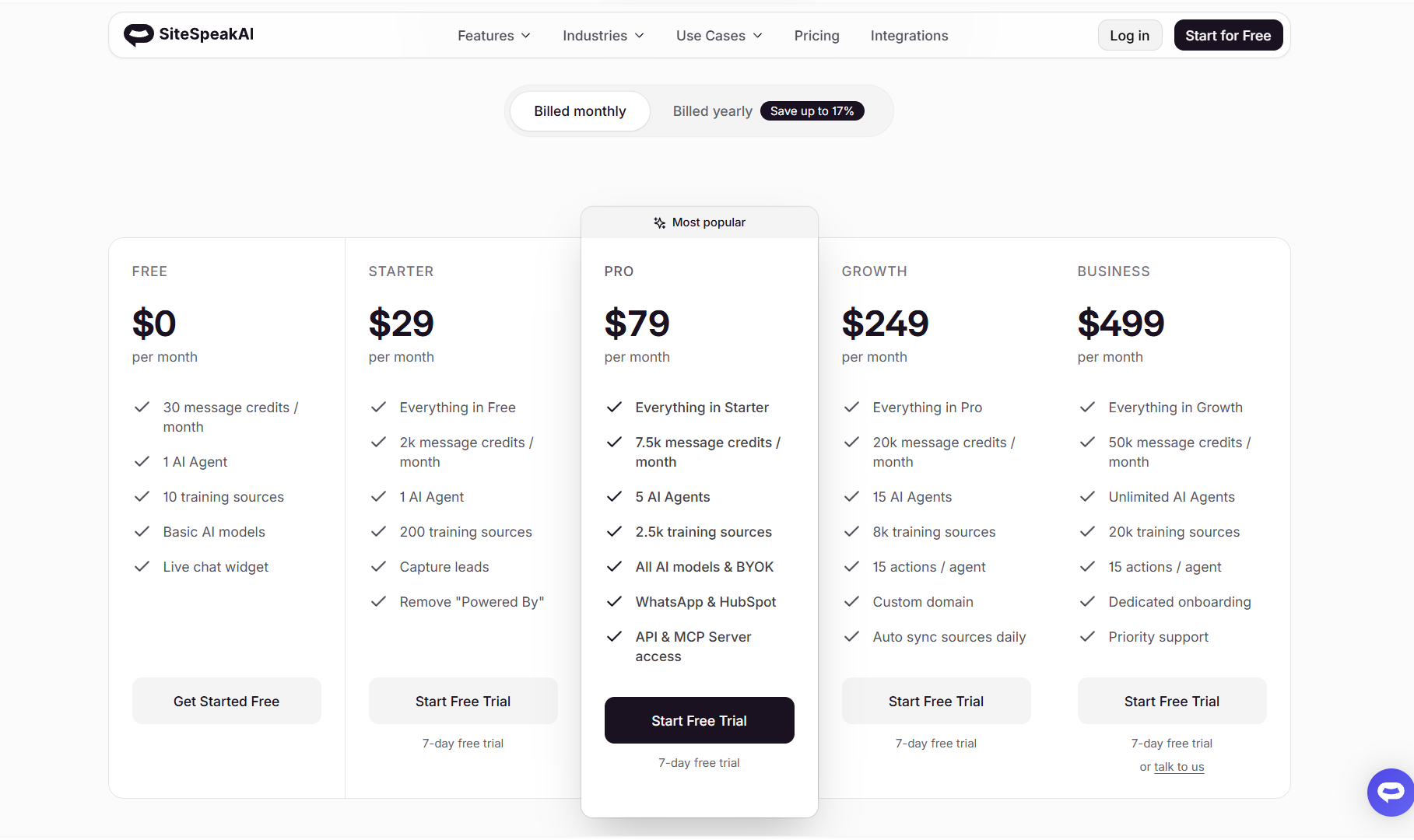
- The free plan is real — 30 message credits, 1 agent, 10 training sources, basic models. It's enough to understand how training and deployment work, but it's not operational for any serious use case.
- Starter ($29/month) gives you 2,000 message credits, lead capture, 200 training sources, and removes the SiteSpeakAI branding. It's the right plan if you have low chat volume and just need FAQ deflection plus lead collection.
- Pro ($79/month) is where the product becomes meaningfully more capable — advanced LLMs, BYOK, WhatsApp, HubSpot, API access, and MCP Server support. For most SaaS companies and e-commerce stores with real traffic, this is the practical minimum.
- Growth ($249/month) adds daily auto-sync, 15 agents, 8,000 training sources, and custom domain support. The target here is multi-brand businesses or agencies with multiple deployments. Business ($499/month) adds unlimited agents, 20,000 training sources, dedicated onboarding, and audit logging.
What's missing from the pricing page is an overage policy. The credit limits are stated but what happens when you hit them is not. That's an information gap that matters at scale.
How SiteSpeakAI Compares With Alternatives
- Chatbase is the most direct competitor. Both are no-code RAG chatbot builders targeting similar buyers. SiteSpeakAI wins on pricing at entry level and includes live chat and human escalation that Chatbase lacks entirely. Chatbase has more third-party reviews and wider brand recognition. If the comparison is purely on paper, SiteSpeakAI looks stronger feature-for-feature at most price points. Whether that holds in practice is harder to verify without independent user data.
- SiteGPT is so similar in positioning that SiteSpeakAI runs an explicit alternative comparison page against it. The practical differences are subtle and largely come down to pricing, UI preference, and specific integration needs. Worth evaluating both in parallel if you're serious.
- Tidio is the more mature option for SMBs that want a well-reviewed live chat and chatbot platform, especially in e-commerce. Tidio has significantly more user reviews, stronger Shopify integration, and a more developed marketing automation layer. SiteSpeakAI is simpler to deploy and train on existing content. Tidio is the safer choice if you're risk-averse; SiteSpeakAI is the leaner, cheaper path if you primarily need knowledge-grounded Q&A.
- Intercom competes on the AI support deflection use case but is a full customer engagement platform. At its lower tiers it starts to overlap with SiteSpeakAI's Pro tier pricing, but Intercom comes with a much deeper feature set, more integration surface area, and meaningful enterprise infrastructure. It's worth the comparison only for teams already leaning toward a full-platform investment.
- Botpress is for teams that want architectural control over their chatbot logic. More flexibility, more complexity, more setup overhead. SiteSpeakAI is for teams that want to skip all of that and just deploy something that works against their existing content.
Final Verdict
SiteSpeakAI is a well-built no-code chatbot for the specific job of deflecting repetitive support queries using your own content. The training breadth, human escalation layer, active development cadence, and transparent pricing give it a real argument over several well-known competitors — particularly Chatbase.
The product looks most convincing for SMBs, SaaS companies with documentation-heavy products, and digital agencies managing chatbot deployments for clients. If you're a solo founder or small team spending meaningful time on repeat support questions, the case for trying it at Starter or Pro is solid.
The main tradeoff is trust. There's almost no independent review data on this product despite its claimed adoption. The team is small, support responsiveness is opaque, enterprise compliance details aren't publicly confirmed, and overage behavior on credit limits is undocumented. None of those are dealbreakers for the target audience — a small business running a customer support chatbot doesn't necessarily need SOC 2. But they are gaps you should go in eyes open about.
The free plan and 7-day trial make testing essentially zero-cost. For most buyers in the right use case bracket, the correct move is to run it against your actual content, evaluate the response quality, and see how the inbox handles your real conversation volume before committing to a paid tier. Given the review gap, that evaluation window is more important here than it would be for a product with more independent third-party signal.
Worth testing. Approach the higher tiers with due diligence.
FAQ
- What is SiteSpeakAI used for?
SiteSpeakAI is used to build and deploy AI chatbots trained on your own business content — help docs, PDFs, website pages, Notion, YouTube, and more. Businesses use it primarily to deflect repetitive customer support questions, capture leads, and provide 24/7 coverage without a human agent on call.
- How does SiteSpeakAI work?
You connect your data sources through the dashboard, the platform indexes your content using retrieval-augmented generation, and you embed the resulting chatbot on your site with one line of JavaScript. When a visitor asks a question, the bot pulls answers from your trained content. When it can't resolve a query, it escalates to a human agent via a built-in inbox.
- Does SiteSpeakAI offer a free plan or trial?
Yes. There's a permanent free plan at $0/month — limited to 30 message credits, one agent, and 10 training sources, which is adequate for evaluation but not production use. All paid plans include a 7-day free trial. No credit card is required to start on the free tier.
- What are the main weaknesses of SiteSpeakAI?
The biggest gaps are limited third-party review coverage (almost no verified user reviews on major platforms), undocumented credit overage behavior, and no publicly confirmed enterprise compliance details (SOC 2, HIPAA, SLA benchmarks). Advanced features like API connectivity and WhatsApp also require the Pro plan at $79/month, not the $29 Starter.
- What are the main alternatives to SiteSpeakAI?
The closest direct competitors are Chatbase and SiteGPT, both occupying near-identical product territory. Tidio is a more mature option for SMBs prioritizing live chat with AI features, especially in e-commerce. Intercom is the step-up option for teams needing a full customer engagement platform. Botpress is for technical teams wanting more architectural control over their chatbot logic.
Verdict at a Glance
- Best for: SMBs, SaaS companies, and digital agencies that want a no-code chatbot trained on existing content with built-in human escalation
- Not ideal for: Enterprise teams needing SLA guarantees or compliance documentation, high-volume sites with unpredictable traffic, or businesses needing proactive outbound or complex agentic workflows
- Core strength: Broad training source support plus a real live chat inbox with human handoff — more complete than most tools at this price point
- Main tradeoff: Very limited independent review data, undocumented overage behavior, and advanced features gated at the $79 Pro tier rather than the $29 entry price
- Bottom line: A capable, well-priced support chatbot with transparent pricing and active development. The trust gap from thin third-party reviews means you should run the free trial seriously before committing — but for the right use case, there's a real product here.
Disclosure: This article may contain affiliate links. If you sign up through them, Coin360 may earn a commission at no extra cost to you. That does not affect our editorial standards, and reviews are written to prioritize accuracy, usefulness, and reader value.


