




 USD
USD


/ 10

Summary
This review breaks down Taskade’s AI-native workspace, including multi-agent execution, the Genesis app builder, pricing model, and where it fits—or falls short—for teams consolidating tools.
Pros
Cons
Taskade Review Scores
Taskade Review: AI Agents, No-Code Apps, and the All-in-One Workspace Bet
Taskade has been quietly repositioning itself for the past two years — from a solid but unremarkable project management tool into something more ambitious: a workspace where AI agents do actual work, not just answer questions. With the October 2025 launch of Genesis, its no-code app builder, the product is now squarely in the multi-agent platform category. Whether that ambition translates into something teams can genuinely rely on is a different question.
This review covers what Taskade actually is, how it works, who it makes sense for, and where the product still has ground to cover.
What Is Taskade?
Taskade is an AI-native workspace platform. It combines project management, team collaboration, custom AI agents, workflow automation, and a no-code app builder into one environment. The idea is that you replace several tools — your task manager, your chat app, maybe your automation stack — with a single workspace that also runs AI agents trained on your data.
The category it belongs to now is closer to multi-agent platform than simple automation tool or project manager. That said, it still handles the basics of project work: task lists, kanban boards, calendar views, docs, and team chat with video.
What separates Taskade from most productivity tools is the execution layer. The AI agents here aren't just writing assistants embedded inside a document. They can be trained on your specific knowledge base, assigned tools like web browsing or Google Drive access, given a model per task (GPT for analysis, Claude for writing, Gemini for research), and deployed inside projects where they run autonomously. The Genesis feature goes further — it generates entire functional apps from a single text prompt.
The problem Taskade is solving: too many teams are running on a pile of disconnected tools, and AI assistance in most of those tools is surface-level. Taskade's pitch is that one workspace, with agents that can actually execute rather than just suggest, collapses that fragmentation.
How Does Taskade Work?
The core workflow runs in three layers that Taskade labels "Workspace DNA": Memory, Intelligence, and Execution.
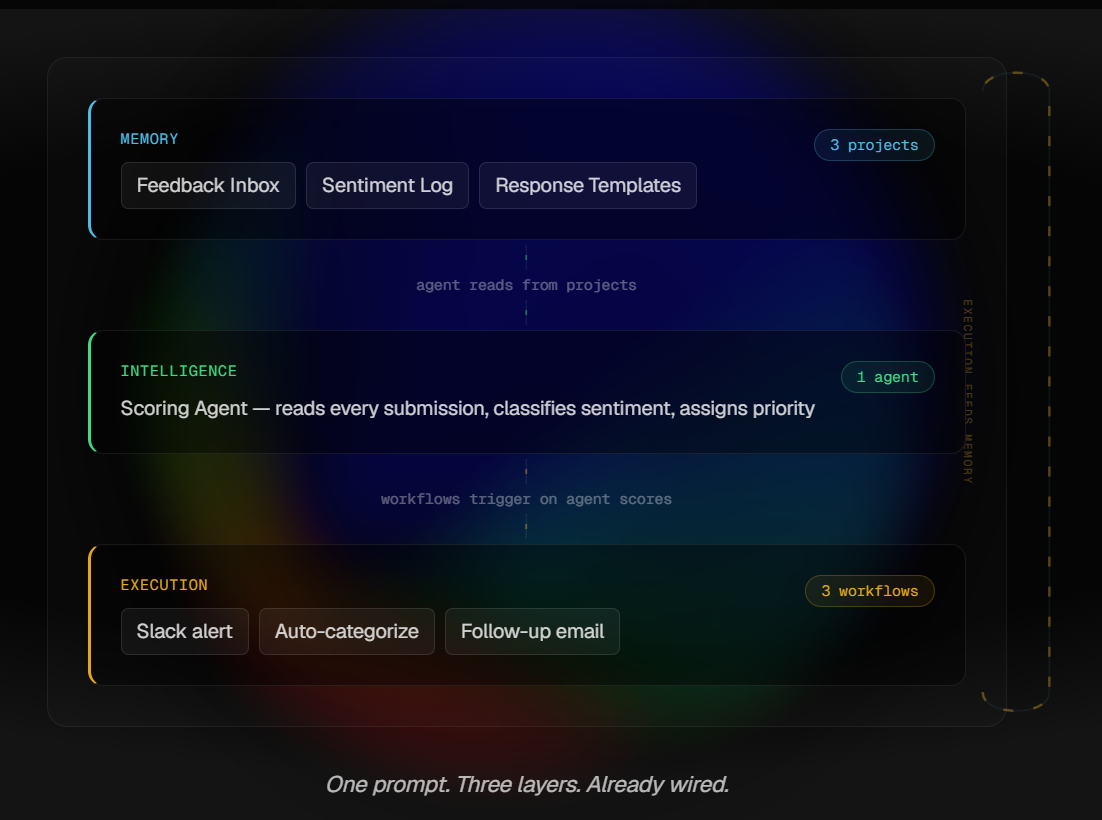
Memory is your projects — structured and unstructured data stored inside the workspace. Intelligence is the AI agents, trained on that data. Execution is the automation engine, built on Temporal durable execution with branching, looping, and filtering, connected to 100+ external services.
In practice: you create a workspace, build projects, then configure AI agents. An agent gets instructions, a knowledge source (uploaded PDFs, pasted URLs, linked documents), and assigned tools. It can be @mentioned inside any project to execute a task — summarizing a doc, reformatting content to spec, researching a topic, drafting a response. Multiple agents can be set up as a team that delegates to one another.
Genesis sits on top of all this. You type what you want to build — a content calendar, a CRM, a client onboarding portal — and the AI generates a functional app with data structures, views, and logic. Based on official figures, 130,000 apps were generated within 90 days of its October 2025 launch.
For automation, you set up trigger-action flows connecting Taskade to external apps. Think of it as a leaner Zapier alternative built into the workspace, covering Google Workspace, Slack, HubSpot, GitHub, Stripe, WhatsApp, and dozens more.
The key constraint to understand: AI actions consume credits. Every model call, automation run, and Genesis generation draws from your monthly credit pool. The credit consumption rate varies based on model complexity and task type. This isn't necessarily a dealbreaker, but it means actual usage cost above your plan's base fee isn't fully predictable until you're in it.
Key Features
- Genesis (No-Code App Builder)
This is the product's most distinctive feature right now. One text prompt generates a working app — database-backed, with embedded agents and automation hooks. For teams that want to quickly prototype internal tools (a bug tracker, a lead pipeline, a client portal) without dev time, this is genuinely interesting. The reported scale — 130K apps in 90 days — suggests real user traction, not just a demo feature.
- Custom AI Agents with Multi-Model Access
You can build agents with uploaded knowledge, specific instructions, and assigned tools. Critically, you can assign different LLMs per agent — OpenAI GPT series, Anthropic Claude, Google Gemini, and hard-reasoning models. On higher-tier plans, auto-routing selects the optimal model per task. This is a meaningful differentiator for teams managing diverse workflows. Most competitors give you one AI assistant, not a configurable set of specialists.
- Multi-Agent Orchestration
Agents can form teams that delegate tasks to each other. This is the most forward-leaning part of Taskade's positioning, and also where verification gets thinner. The vendor's claims here are strong; independent validation of how this performs under real production complexity is harder to find. It's a compelling design. The real-world reliability floor at scale is less clear.
- 100+ Integrations with Automation Engine
The coverage is broad: Google Workspace, Slack, Teams, Discord, HubSpot, GitHub, Stripe, Shopify, WhatsApp, Reddit. Webhooks and external API connections on higher tiers. The automation engine handles branching, looping, and conditional logic — this is not a simple if-then tool.
- Multiple Project Views
List, board, mind map, calendar, org chart, and timeline. The timeline view is worth flagging separately: it exists, but it is not a full Gantt chart. No task dependencies, no resource allocation. Teams coming from ClickUp or MS Project will feel the gap immediately.
- Built-in Video, Chat, and Collaboration
Real-time chat and video calls are baked into projects. The pitch is that you stop switching between the workspace and Slack or Zoom. This lowers context-switching cost for small teams — how much it reduces for larger organizations depends heavily on existing workflows and tool inertia.
Setup and Onboarding
Getting started with Taskade is fast. No credit card is required on the free tier, cross-platform apps are available (macOS, Windows, iOS, Android, plus Chrome/Firefox/Edge extensions), and the template library cuts down initial setup time.
For basic task and project use, the learning curve is low. For the AI agent configuration, knowledge base setup, and Genesis app building, there's more involved — but it's accessible to non-technical users. No API keys, no Python.
The part worth flagging for buyers: the mobile app is functional for task updates and chat, but complex workflow and automation setup requires desktop. If your team operates primarily from mobile, this creates friction in the setup phase.
Offline capability is limited. AI agents, real-time sync, and automation all require connectivity. You can view cached content offline but can't create or edit. For teams in low-connectivity environments, this matters.
Time to first real value appears short for simple use cases. The Genesis app generation is reportedly fast — functional app from prompt in under a minute. For multi-agent workflow value, the investment is front-loaded. You need to configure agents, load knowledge, connect integrations. The upfront setup pays off in recurring automation; it's not a day-zero win.
Real-World Use Cases
- Content teams running repeatable production workflows. An agent trained on brand voice, editorial guidelines, and past content can handle drafting, formatting to spec, and quality-checking against predefined rules. This is one of the cleaner fits — well-defined input, structured output, clear feedback loop.
- Small teams building lightweight internal tools without engineering support. Genesis is the right tool for this. A CRM skeleton for a 5-person sales team, a client onboarding flow, a research tracker — these don't need a developer. They do benefit from Genesis's speed.
- Operators managing multi-step workflows across connected apps. If you're running triggers between HubSpot, Google Sheets, Slack, and email, and you want AI in the loop at certain stages, Taskade's automation-plus-agent combination is worth evaluating. More flexible than no-code tools like Zapier for workflows where the AI needs to reason rather than just route.
- Research workflows for analysts and strategists. A web-browsing agent can pull, synthesize, and summarize across sources. Combined with a project structure for organizing outputs, this can replace a chunk of manual research work for knowledge workers.
- Startups or solo operators looking to consolidate their stack. If you're currently paying for a task manager, a team chat app, a separate AI writing tool, and an automation product, Taskade's pricing structure creates a real consolidation case. Particularly for small teams where the per-user economics are the tightest.
Who Is Taskade Best For?
- Small to mid-sized teams — roughly 2 to 15 people — who want AI-powered workflow execution without the overhead of building and maintaining their own automation infrastructure. This is the clearest fit.
- Solopreneurs and freelancers managing content, client work, or operations who want AI agents that remember context and can handle repeatable tasks without re-prompting every session.
- Non-technical operators and founders who want to build internal tools quickly — client portals, trackers, workflow apps — but don't have developer resources and don't want to wait for one.
- Teams already running a fragmented stack of productivity tools who are actively looking to consolidate. The per-team pricing looks compelling against Notion Business, ClickUp, or Monday.com at equivalent team sizes.
- Budget-conscious early-stage companies that want serious AI agent capabilities without per-seat pricing that scales aggressively.
Who Should Avoid Taskade?
- Enterprise teams with established project management infrastructure who need full Gantt charts, task dependencies, resource allocation, and portfolio reporting. Taskade is built for agile speed. It is not a Smartsheet or MS Project replacement.
- Organizations in regulated industries where security certifications beyond GDPR compliance are a procurement requirement. Taskade's GDPR posture is documented, but broader compliance certifications (SOC 2, ISO 27001) are not confirmed in available sources.
- Teams whose primary need is deep documentation and knowledge management. Notion is more flexible for database-driven wikis and structured documentation. Taskade's strength is execution, not documentation depth.
- Users who just need a simple chatbot or writing assistant. Taskade's depth becomes overhead if you're not going to use agents, automation, or Genesis. There are cheaper, simpler options.
- Anyone who needs predictable AI cost budgeting. The credit-based consumption model introduces variability above the base plan fee. If procurement requires fixed monthly cost certainty, this model creates friction.
Strengths
- AI agents included at accessible pricing, not locked behind enterprise tiers. Notion put meaningful AI behind its Business plan. ClickUp AI is capable but per-seat costs add up quickly. Taskade bundles custom agents into its plans at price points that are genuinely lower for small-to-mid teams. This matters for adoption decisions, not just aesthetics.
- Multi-model agent configuration is differentiated. Assigning different LLMs to different agents for different tasks — Claude for reasoning, GPT for speed, Gemini for multimodal — and having auto-routing on premium tiers is more sophisticated than what most competing platforms offer. Teams with diverse AI workflow needs benefit from this directly.
- Genesis turns internal tool development from a dev project into a weekend experiment. For non-technical teams, the ability to go from a sentence-level description to a functional app with embedded agents is a genuine capability gap closed. The adoption cost for basic tools drops significantly.
- All-in-one structure reduces context switching for small teams. Video, chat, tasks, docs, agents, and automation in one workspace is meaningful friction reduction when the team is small enough to operate entirely within it. Less meaningful as organizations grow and tool specialization increases.
- The pricing per team is notably lower than established competitors. The math at the Pro tier versus ClickUp or Monday.com for a team of ten is not close. For budget-sensitive buyers, this is the strongest argument.
Weaknesses
- No full Gantt chart with dependencies and resource allocation. This is a real gap, not a minor omission. The timeline view is lightweight. Teams planning complex projects with dependencies across workstreams will hit this wall quickly. It is not the right tool for waterfall-style project management.
- The credit consumption model creates cost uncertainty. Your plan's base fee is clear. What you'll actually pay when agents run complex tasks at premium model tiers is less predictable. For teams running intensive multi-agent workflows, budgeting gets harder. This is the kind of pricing design that causes invoice surprises.
- Multi-agent orchestration relies heavily on vendor claims. The orchestration architecture sounds convincing. What's missing is independent documentation of how it performs under real production complexity — concurrent agents, long-running tasks, failure recovery. Teams considering heavy automation dependence should treat this as a verification task, not an assumption.
- Mobile app creates a friction layer for complex setup. Task updates and chat work on mobile. Automation configuration, advanced agent setup, and Genesis building require desktop. This is not a dealbreaker for most teams, but it's a real constraint.
- The breadth pitch creates a depth tradeoff. Taskade is simultaneously a project manager, AI agent platform, no-code app builder, and team communication tool. That's a large surface area. Teams with deep requirements in any one of those categories — enterprise PM, sophisticated CRM, complex knowledge management — will find more specialized tools more capable. The strongest fit is teams who want "good enough plus AI" across several of those categories, not teams who need excellence in any single one.
- Pricing clarity is genuinely inconsistent across sources. The official pricing page, the help center, and third-party reviews cite different plan names, user counts, and monthly figures. The credit system adds another variable on top. Before committing, check the official pricing page directly — do not rely on any figure in this article or elsewhere as definitive.
Pricing and Plans
Taskade has a free tier with a limited monthly AI credit allocation, available without a credit card. Paid plans run on a credit-based model — credits power all AI operations: agent actions, Genesis app generation, automation runs, and model calls. Credits reset monthly.
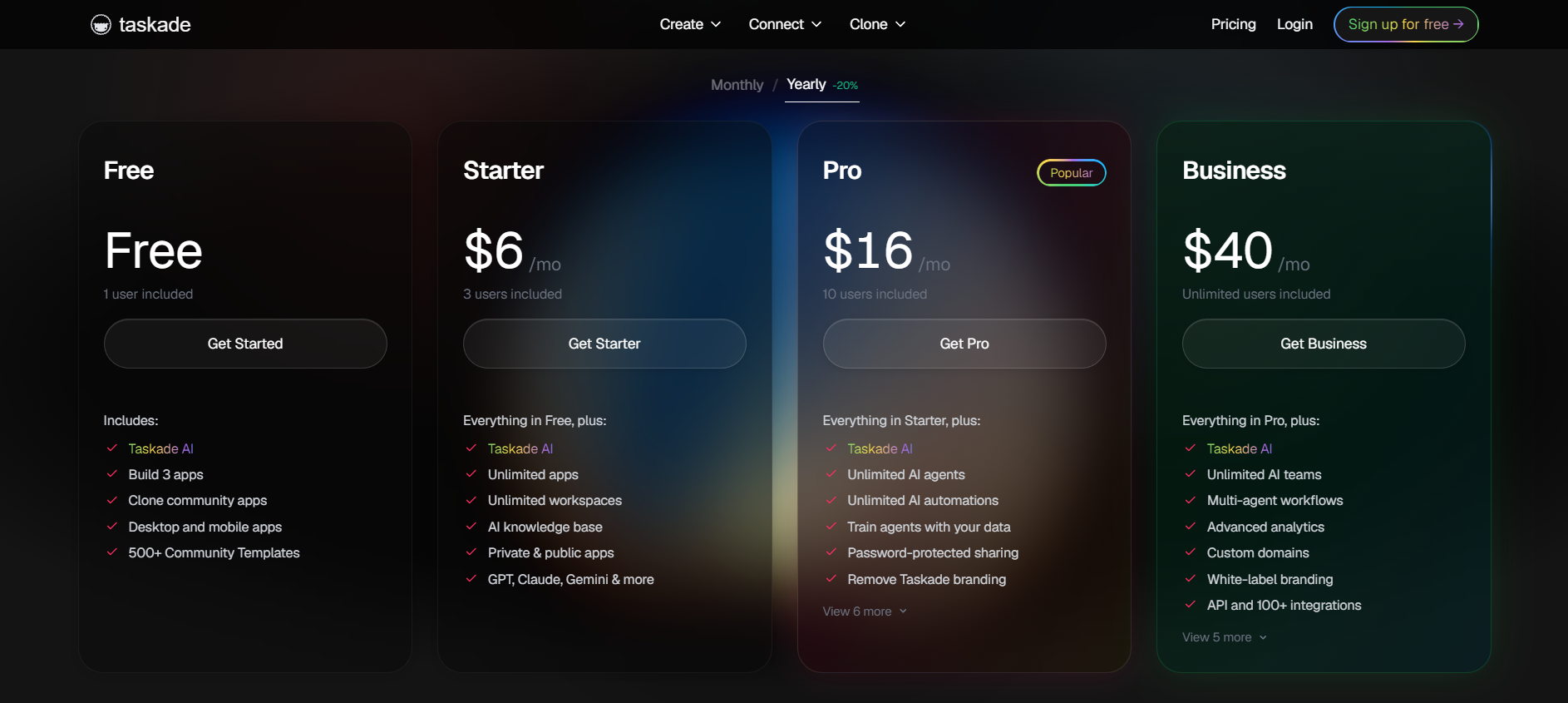
Based on available official and third-party sources, paid plans start at roughly $6/month at the entry tier and move up through a Pro tier (approximately $16/month for a defined team size with unlimited agents and frontier AI models) to Business and Enterprise tiers covering custom domains, white-labeling, SSO/SAML, and private cloud deployment.
The credit consumption rate varies by model and task complexity. Premium reasoning models (OpenAI o-series, frontier Claude) consume credits faster than balanced models. Auto top-up is available to prevent workflow interruption.
Discounts for students, nonprofits, and startups are mentioned by the vendor.
The pricing design looks genuinely accessible for small teams compared to ClickUp's per-seat model or Notion's Business tier requirement for meaningful AI access. The credit consumption variability is the honest caveat. What the pricing feels like for moderate AI usage and what it looks like for heavy multi-agent usage may be different numbers — worth testing on a paid plan before committing at scale.
One user complaint on Capterra cited unexpected billing after a trial without clear notification. Worth keeping in mind when evaluating the trial-to-paid transition.
How Taskade Compares With Alternatives
- Taskade vs. Notion AI
Notion is the stronger tool for teams whose core job is documentation — database-driven wikis, flexible page structures, complex knowledge bases. As of May 2025, Notion locked meaningful AI behind its Business tier, and its AI remains more assistive than agent-based. There is no Genesis equivalent in Notion. If your primary use case is docs and knowledge management, Notion is likely still the better fit. If you need agents that execute and tools that build, Taskade is more capable at lower cost.
- Taskade vs. ClickUp
ClickUp offers more mature project management infrastructure — native Gantt charts with dependencies, advanced reporting, portfolio views, granular task management. For engineering teams or operations-heavy organizations that need structured project execution, ClickUp is the stronger choice. Taskade beats ClickUp on AI agent depth and no-code app building, and undercuts it significantly on price for comparable team sizes. The decision often comes down to: do you need serious project management tooling, or serious AI execution tooling?
- Taskade vs. Monday.com
Monday.com is well-positioned for visual, dashboard-driven project management at team scale. Its automation is rule-based and mature. Taskade goes further on AI agent autonomy but offers less in the way of visual reporting and project governance. For operations teams that report upward and need dashboards, Monday.com holds an edge. For teams that want AI to do work rather than visualize it, Taskade is more relevant.
- Taskade vs. Lindy
Lindy is a focused AI agent platform designed to execute across email, calendar, CRM, and chat. It does not try to be a workspace. For teams whose primary goal is agent-driven cross-app execution — without needing a project management layer or built-in collaboration — Lindy may be more precise for that specific job. Taskade is the better option when you want agents embedded inside a broader work environment rather than running as standalone automations.
Final Verdict
Taskade is a genuine bet on a specific idea: that small teams should have one workspace where AI agents actually execute work, not just respond to prompts. That bet is more credible now than it was 18 months ago, and Genesis has added a capability — prompt-to-app in under a minute — that most competitors do not have a direct answer to.
The strongest fit is small to mid-sized teams that want AI workflow execution, want to consolidate their tool stack, and do not have engineering resources to build custom automation. For that profile, Taskade's pricing advantage over ClickUp and Notion is real, the agent capabilities are meaningfully better than what those platforms bundle at equivalent tiers, and the all-in-one design reduces operational friction.
The weakest fit is teams that need complex project management governance — dependencies, resource allocation, portfolio reporting — or enterprise security requirements beyond GDPR. The product is built for agile speed, not structured waterfall execution. It shows.
The main tradeoff is breadth versus depth. Taskade does a lot of things competently. It does not do any one thing at the same ceiling as the best specialized tool in that category. Teams that know exactly what they need from a project manager, or exactly what they need from an enterprise knowledge base, will find more capable options. Teams that want a capable AI-native generalist workspace — and are willing to spend the setup time to configure agents and automations properly — will find Taskade worth the evaluation.
It is worth testing on a paid plan for any team in the 2–15 person range that is currently running three or more productivity tools and is open to consolidation. The free tier gives a real preview; meaningful judgment on the AI agent layer requires a paid plan.
FAQ
What is Taskade used for?
Taskade is an AI-native workspace platform used for project management, team collaboration, workflow automation, and deploying custom AI agents trained on your data. Its Genesis feature lets users generate functional internal apps from a single text prompt.
How does Taskade's AI work?
Users build custom AI agents by uploading knowledge (documents, URLs), assigning instructions, and connecting tools like web browsing or Google Drive. Different AI models (GPT, Claude, Gemini) can be assigned per agent. Agents run inside projects, can be @mentioned to execute tasks, and can be organized into teams that delegate work to each other.
Who should use Taskade?
Small to mid-sized teams (roughly 2–15 people) wanting AI workflow execution without developer overhead, solopreneurs managing repeatable operations, and non-technical founders who need to build lightweight internal tools quickly. Teams looking to consolidate a fragmented stack of productivity apps are a strong fit.
Does Taskade offer a free plan or trial?
Yes. Taskade has a free tier with a monthly AI credit allocation, available without a credit card. Paid plans unlock more credits, additional agents, more automations, and access to frontier AI models.
What are the main alternatives to Taskade?
The most relevant alternatives, depending on your primary need, are Notion AI (stronger for documentation and knowledge management), ClickUp (stronger for structured project management with Gantt and reporting), Monday.com (stronger for visual project oversight), and Lindy (more focused for cross-app AI agent execution without the workspace layer).
Does Taskade have a Gantt chart?
Taskade offers a timeline view but not a full Gantt chart with task dependencies and resource allocation. Teams that need that level of project management structure should look at ClickUp, Smartsheet, or dedicated PM tools instead.
Verdict at a Glance
- Best for: Small teams wanting AI agents and workflow automation in one workspace without per-seat pricing at scale
- Not ideal for: Enterprise teams needing full Gantt charts, task dependencies, and portfolio reporting
- Core strength: Custom AI agents at accessible pricing, multi-model configuration, and no-code app generation via Genesis
- Main tradeoff: Broad coverage at the cost of depth in any one category; credit consumption model adds cost unpredictability at heavier usage
- Bottom line: A credible all-in-one AI workspace for small teams willing to invest in proper setup. Worth testing if you are currently running three or more productivity tools and want AI that executes rather than just assists.
Disclosure: This article may contain affiliate links. If you sign up through them, Coin360 may earn a commission at no extra cost to you. That does not affect our editorial standards, and reviews are written to prioritize accuracy, usefulness, and reader value.


